Expected results
Difficulty
Advanced
Industry
Ecommerce
Goals
Boost conversions
When to use it?
Do you want to grab your shoppers' attention instantly and communicate your product's value without overwhelming them? Whether it's a small accessory or a high-ticket item, showing the most important benefits upfront is critical in convincing customers to buy.
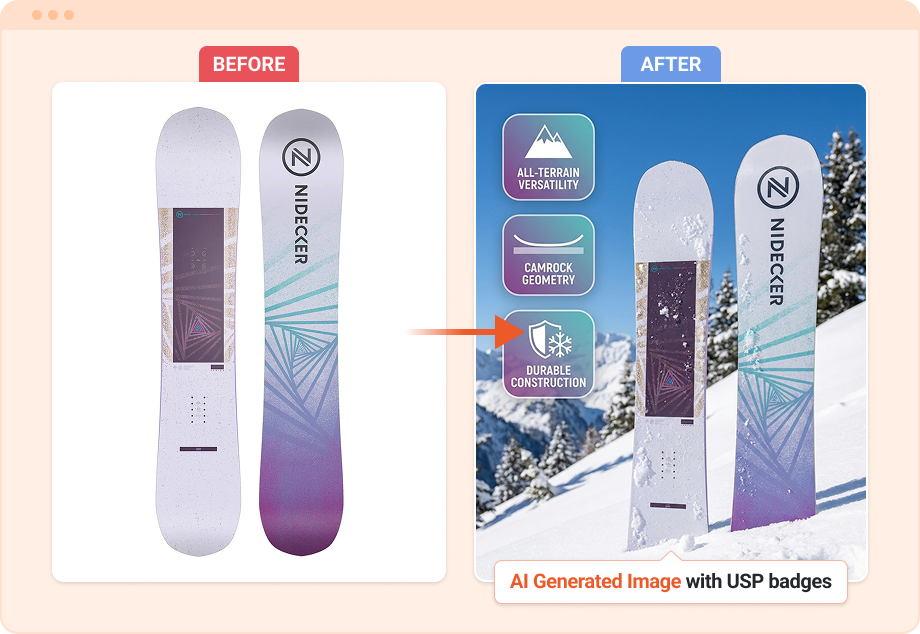
With Product Value Spotlight, OptiMonk’s AI analyzes your product’s USPs (Unique Selling Points) and automatically highlights them directly on your product images.
This transforms your existing product page by creating a more engaging, visually optimized shopping experience, which in turn boosts your product page's conversion rate.
The AI-generated images are seamlessly embedded into your product page, saving you time and effort. The best part? It’s all done automatically, not just for one, but for hundreds or even thousands of product pages.
Plus, the AI will A/B test your new product pages against the original version, ensuring that you’re always improving your conversion rates and maximizing revenue without lifting a finger.
How to set it up?
Step 1: Book a demo
To access this feature, you’ll need to book a demo with our team. During the call, we’ll talk about your website, your product line, and any specific goals you may have.
Step 2: Set up your Product Value Spotlight
Once we’ve had our call, we’ll handle the rest! We’ll configure the AI system to analyze your product's benefits and generate optimized visuals with context-based badges tailored for your product.
Step 3: Review and finalize
Once your campaign is ready, we’ll ensure the badges, lifestyle images, and product benefits align with your brand’s identity and goals. You’ll receive the final product visuals for approval.
Step 4: Activate your campaign
After approval, you’re good to go! Your AI-generated visuals will appear automatically on your product pages, showcasing the benefits that matter most to your audience.