


Ecommerce Personalization: Strategy, Stats, Trends and Tools
What ecommerce personalization is, what our data from 18,000 stores shows, a 5-step strategy and the software you need for each job.
The visitor segments an online store can build from day one, the rule behind each, and how to set them up.
In short
Ecommerce segmentation splits your store's shoppers into groups by shared signals, such as where they came from, what they browsed and what's in their cart. It matters because one message rarely fits everyone. Start with three to five rule-based segments, give each one message, and measure against a holdout.
Two shoppers land on your store in the same minute. One tapped an Instagram ad on her phone. The other is back for the third time this week and already has two items waiting at checkout.
Show them the same 10% popup and you lose twice. The first one needed a reason to trust you, and the second one would probably have bought without the code.
Most of your visitors are anonymous: no account, no email, no orders. Still, the first page load tells you their country, the link that brought them and whether they've been here before. That's enough to group them.
Ecommerce segmentation is splitting an online store's visitors and customers into groups that share a signal: location, traffic source, pages browsed, cart contents, purchase history or an answer they gave you. Each group then gets its own message or offer. Most stores do best starting with three to five clear, rule-based segments.
A segment is a rule, not a list. The rule is checked again on every visit, so someone who places an order today is no longer a "first-time visitor" tomorrow, and nobody has to update a spreadsheet.
Segmentation decides who is in a group. Personalization decides what that group sees, and for that side, see these website personalization examples.
Visitor segmentation groups everyone on your site, while customer segmentation groups only the people you already know. Most guides cover only the second, which leaves out most of your traffic.
| Customer segmentation | Visitor segmentation | |
|---|---|---|
| Who | Known customers and subscribers | Everyone on the site, mostly anonymous |
| Data | Orders, email activity, CRM | Country, traffic source, pages viewed, cart, visit count, answers |
| Where it's used | Email, SMS, ads, loyalty programs | On the store, during the visit |
| Typical tool | Email/SMS platform, store admin | Onsite targeting (popups) |
The two meet when you use a segment from your email tool on the site, for example a Klaviyo VIP segment that decides who sees an early-access popup. Grouping your subscribers for campaigns is a separate job, covered in our guide to email list segmentation.
There are seven common segmentation models. Only some work for visitors you don't know yet.
| Model | What it groups by | Works for anonymous visitors? |
|---|---|---|
| Geographic | Country, region, currency | Yes |
| Behavioral | Pages viewed, cart, visit count | Yes |
| Acquisition source | Ad, search, social, email, UTM tags | Yes |
| Psychographic | Values, interests, style | Only if they tell you (quiz, survey) |
| Lifecycle | New, active, lapsed customer | Partly (subscriber and customer status) |
| Value-based / RFM | Recency, frequency, monetary value of orders | No, it needs order data |
| Demographic | Age, gender | Rarely; don't guess it |
Read more on each: geotargeting, behavioral segmentation, UTM codes, psychographic segmentation and customer lifecycle management.
A store can start with the first three rows on day one, before it has any customer data.
These customer segmentation examples work without a CRM: each one uses a signal from the visit or from a tool you already have. For each: who they are, the signal, the rule and one line on what to show (more ideas in these types of website personalization).
Who they are: people on your store for the first time, who don't know your brand yet.
The signal: no previous visit (a cookie from an earlier visit is missing).
The rule: first visit AND NOT subscriber
What to show: a short introduction and a first-order offer, after a delay such as 5 seconds or 50% scroll, so they see a product before the offer. For wording ideas, see these welcome message examples.
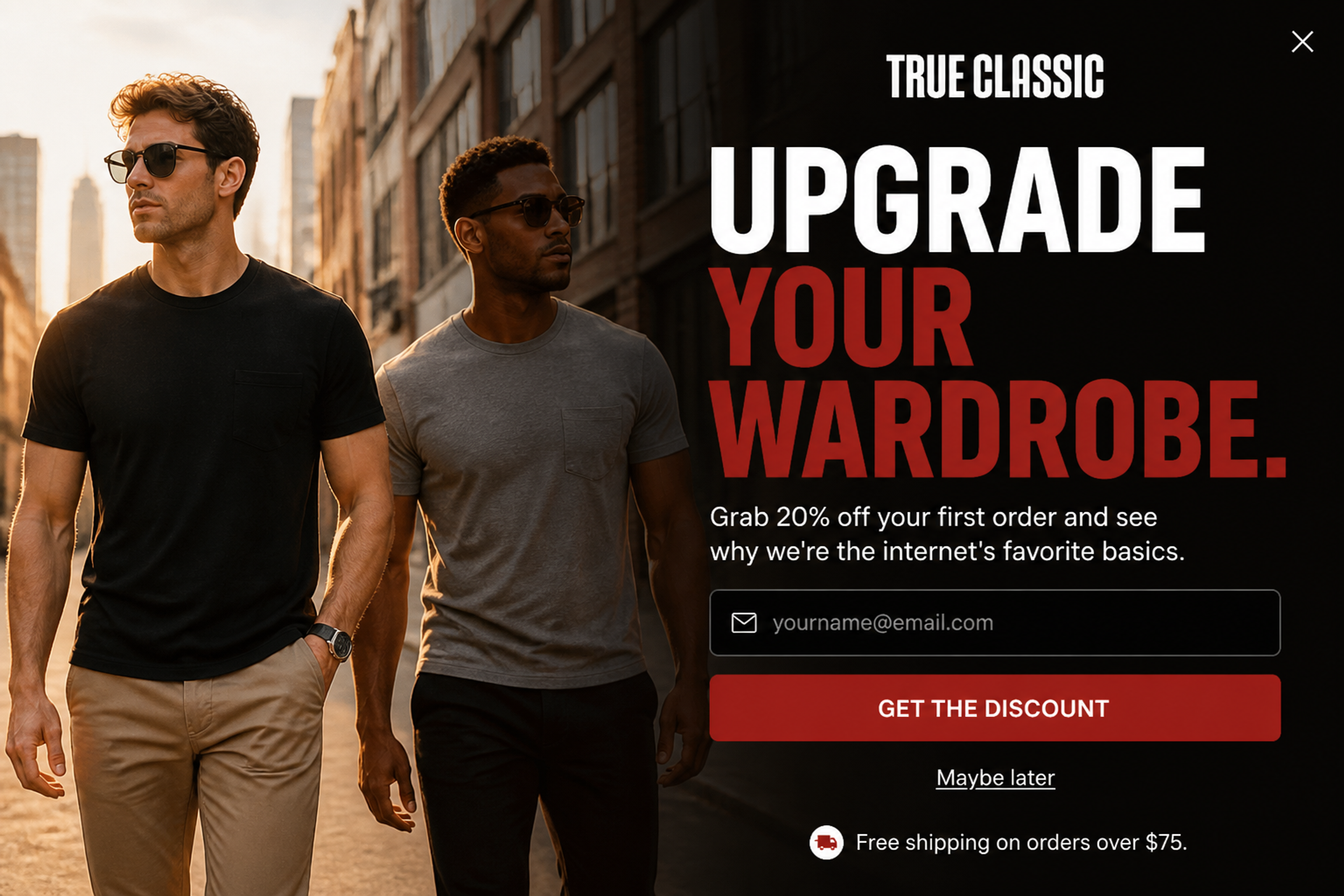
A first-time visitor gets a one-line introduction ("see why we're the internet's favorite basics") next to a first-order offer of 20% off. The email field and the "Get the Discount" button turn that first visit into a subscriber.
Who they are: shoppers who came back but haven't ordered. Your store is on their shortlist.
The signal: visit count of 2 or more, no order.
The rule: returning visitor AND NOT customer
What to show: a "pick up where you left off" message with the products they looked at last time.
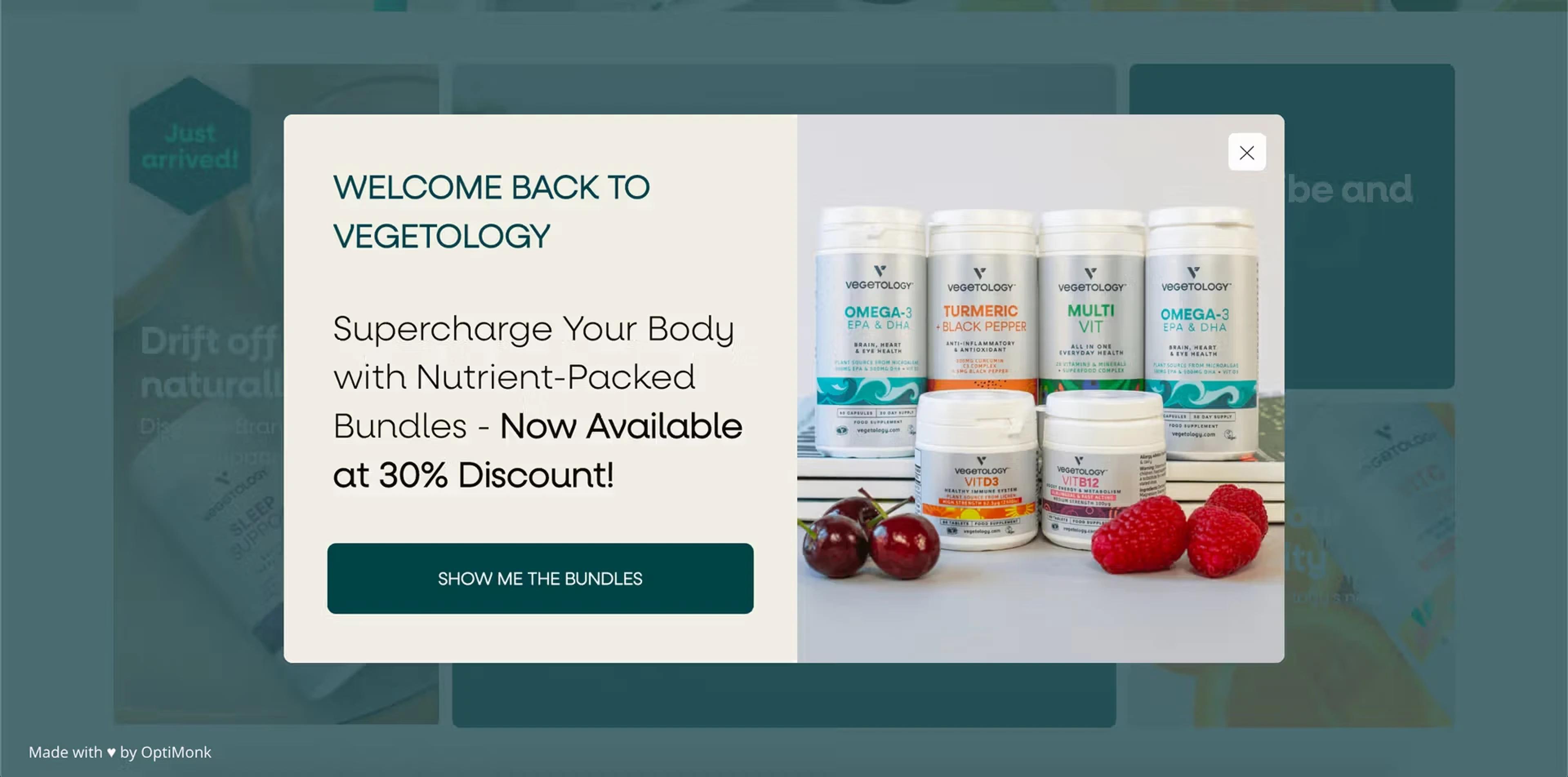
Vegetology showed returning visitors a personal welcome message with an offer they hadn't seen yet: new product bundles at 30% off. These shoppers already knew the brand, so a bundle was an easy next step, and the popup reached a 14.59% click-through rate.
Read the Vegetology case study
Who they are: visitors who keep opening products in one category, such as running shoes or face serums.
The signal: visited pages, for example the URL contains /collections/running or a specific product handle.
The rule: viewed 2+ product pages in [category]
What to show: a few product recommendations from that category, or a helping question ("Road or trail?").
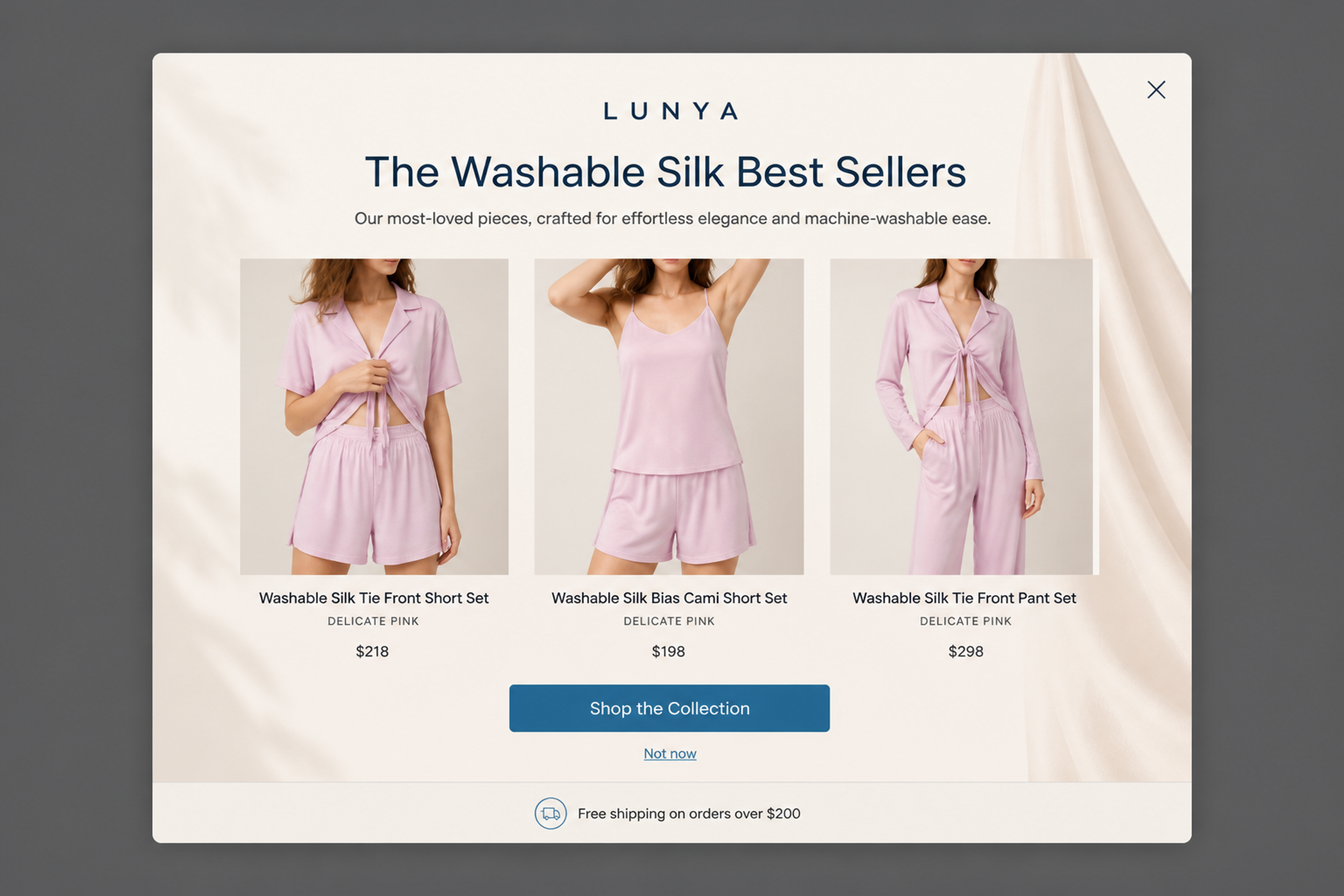
Someone browsing one category sees the best sellers from that same category, here three washable silk sets with names and prices. The "Shop the Collection" button keeps them inside the category they were already exploring.
Who they are: shoppers with items in the cart who are about to leave. A $25 cart and a $150 cart are different problems, so split them.
The signal: cart value, number of products, a specific product in the cart.
The rule: cart value ≥ $X AND exit intent
What to show: below your free shipping threshold, tell them how far they are from it (a fixed amount in the popup copy). Above it, a reminder with no code, or a smaller one. The Turmeric Co. used two versions by cart value: 20% off over £79 and 10% off between £25 and £79 (read the story). For the full recovery playbook, see our guide to abandoned cart recovery.
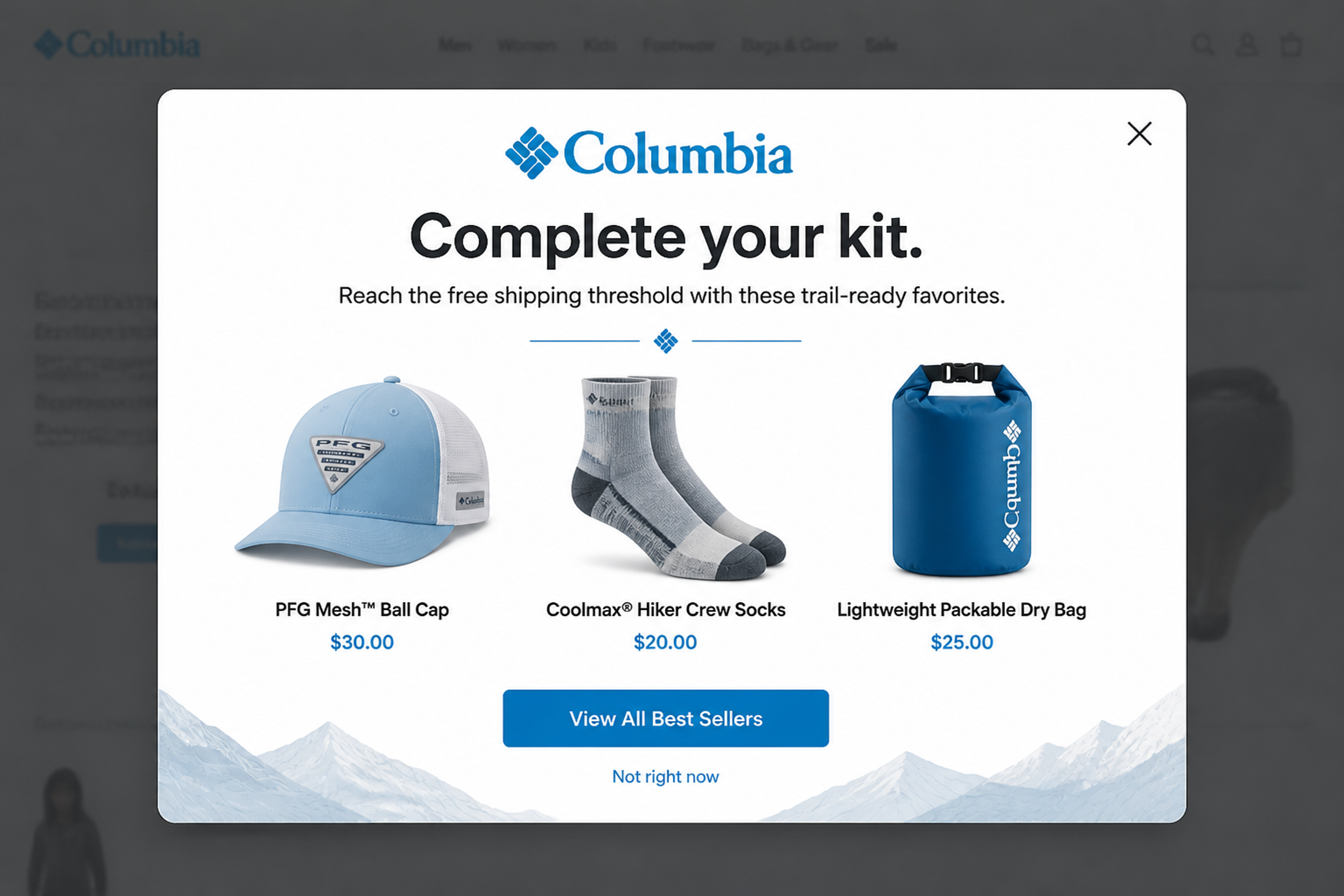
Instead of a discount code, a shopper with a cart below the free-shipping threshold is shown low-priced add-ons: "Reach the free shipping threshold with these trail-ready favorites." It works for smaller carts, where a small add-on closes the gap.
Who they are: visitors grouped by the link that brought them: Google search, Google Ads, a Facebook or Instagram ad, direct traffic or your own UTM-tagged campaign.
The signal: traffic source or utm_source.
The rule: utm_source = instagram AND first visit
What to show: the offer from the ad they clicked, repeated on the store.
Source deserves its own segment because shoppers from different channels behave differently. In OptiMonk's data from 18,000 ecommerce websites, cart abandonment is 77.54% for social media traffic, 69.39% for direct traffic and 63.81% for search traffic, against a 70.32% average (ecommerce conversion rate statistics).
Who they are: shoppers from outside your home market, whose first question is shipping.
The signal: country.
The rule: NOT from [home country]
What to show: delivery time, currency and duties for their country. For more on location, see our guide to geotargeting.
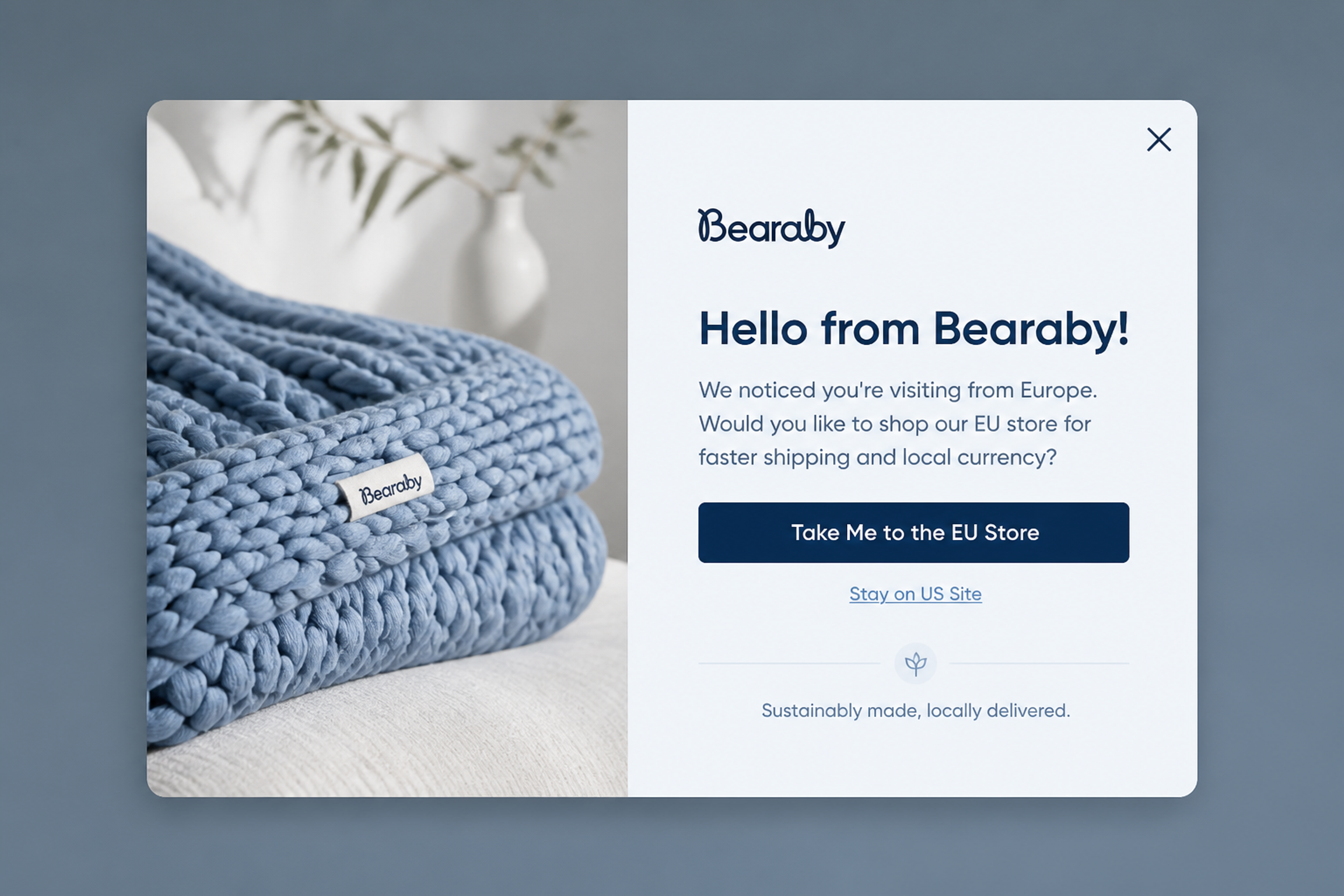
A visitor from Europe is told up front that there is an EU store with "faster shipping and local currency", and can switch with one button or stay on the US site. It answers the delivery question before it becomes a reason to leave.
Who they are: people who already gave you their email address.
The signal: subscriber status.
The rule: NOT subscriber on every signup popup
What to show: nothing, or a different offer. The cheapest segment to build is the one you leave out: a subscriber who sees "Join our list for 10% off" again learns that your popups aren't meant for them.
Who they are: repeat buyers and your best customers.
The signal: a segment from your store or email tool, for example a Klaviyo segment such as "placed 3+ orders" or "VIP".
The rule: in Klaviyo segment = VIP
What to show: early access to a launch, not a discount. They already buy at full price.
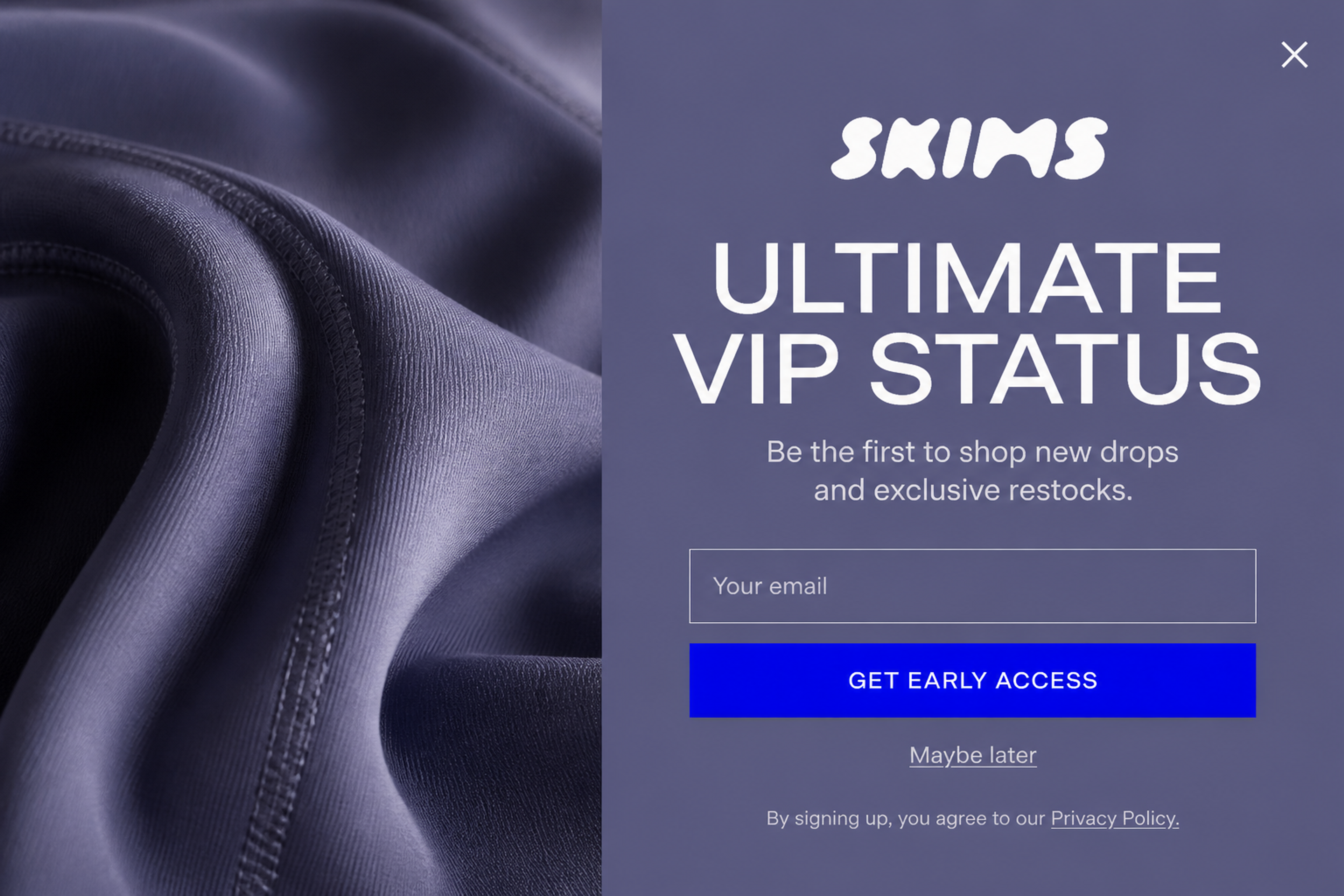
The reward here is access, not a discount: "Be the first to shop new drops and exclusive restocks." For customers and VIPs, early access to a launch keeps margins intact and still feels exclusive.
Klaviyo calculates the segment; OptiMonk only reads it to decide who sees the popup. OptiMonk doesn't send emails or SMS.
Who they are: visitors who answered a quiz or survey question, such as "What's your skin type?" That's zero-party data, given on purpose.
The signal: a quiz or survey answer.
The rule: answered "Sensitive skin"
What to show: a product that matches the answer, and a code if you offered one for answering. For more, see these zero-party data examples and quiz funnel examples.
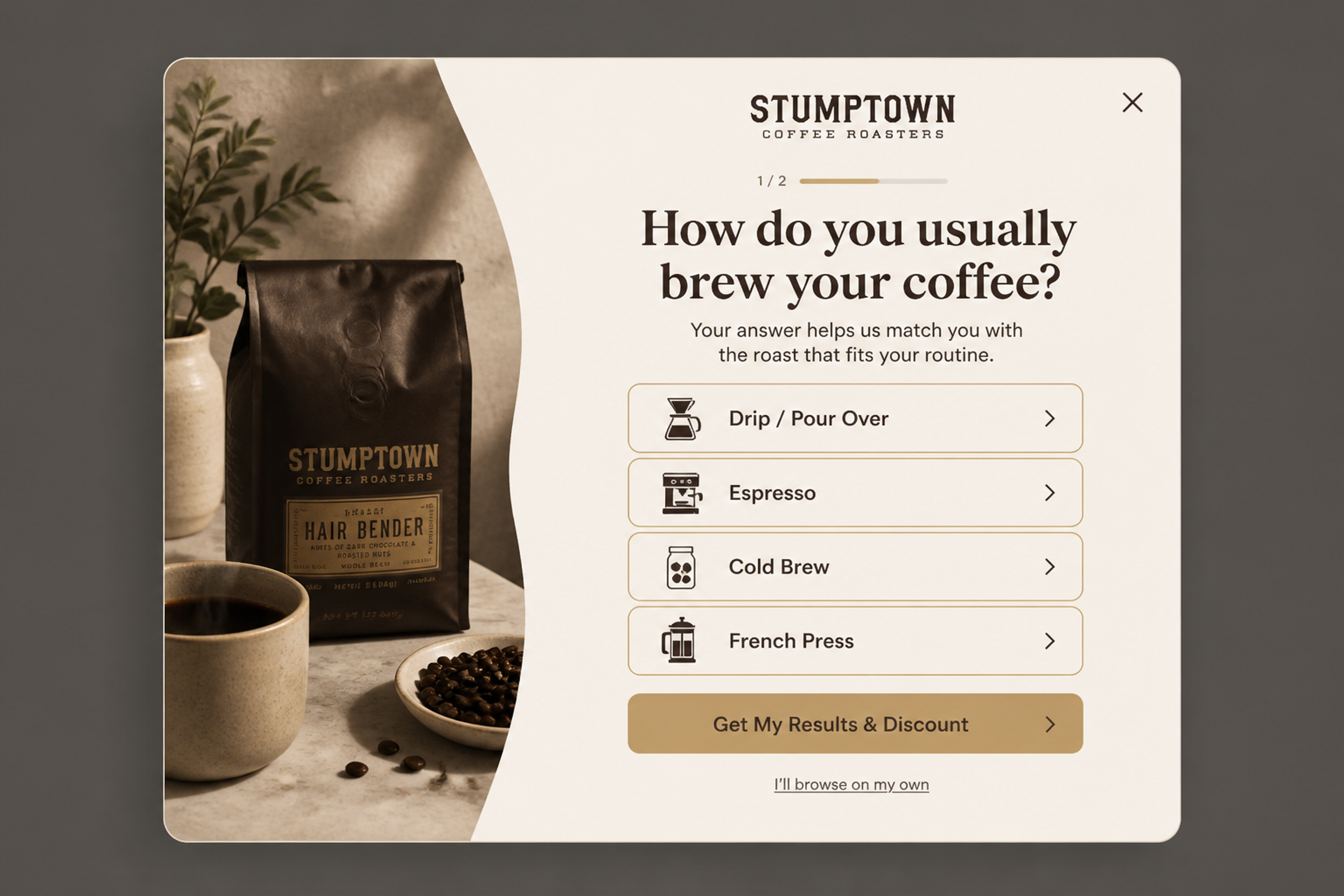
The quiz asks one question about brewing method and uses the answer to match a roast: "Your answer helps us match you with the roast that fits your routine." The same answer is the preference the segment is built on.
Start with three to five of these nine. Each segment needs enough traffic to measure, and a small store with nine segments ends up with nine groups too small to learn from.
Pick a goal, list your signals, write each segment as one rule, check its size, then give it one message and measure it.
| Segment | Rule | Trigger | First message |
|---|---|---|---|
| First-time visitors | First visit, not a subscriber | After 5 seconds or 50% scroll | Introduce the brand, first-order offer |
| Returning, no order | Returning visitor, not a customer | On page load | Products they viewed last time |
| Category browsers | 2+ product pages in one category | Exit intent | Best sellers from that category |
| Cart abandoners, low value | Cart value below free shipping threshold | Exit intent | How much is left to free shipping |
| Cart abandoners, high value | Cart value ≥ $100 | Exit intent | Reminder, no code |
| Instagram ad traffic | utm_source = instagram, first visit | After 5 seconds | Repeat the ad's offer |
| International visitors | Not from your home country | After 5 seconds | Delivery time and duties |
| Subscribers | Subscriber | — | Exclude from signup popups |
| VIP customers | In the VIP segment of your email tool | On a launch page | Early access, no discount |
For real examples of what each group can see, see these types of website personalization.
These come from the OptiMonk Popup Library, designed by the OptiMonk agent for real stores' brands. Each fits one segment above.
1. The Routine Builder (designed for Saie), for preference segments
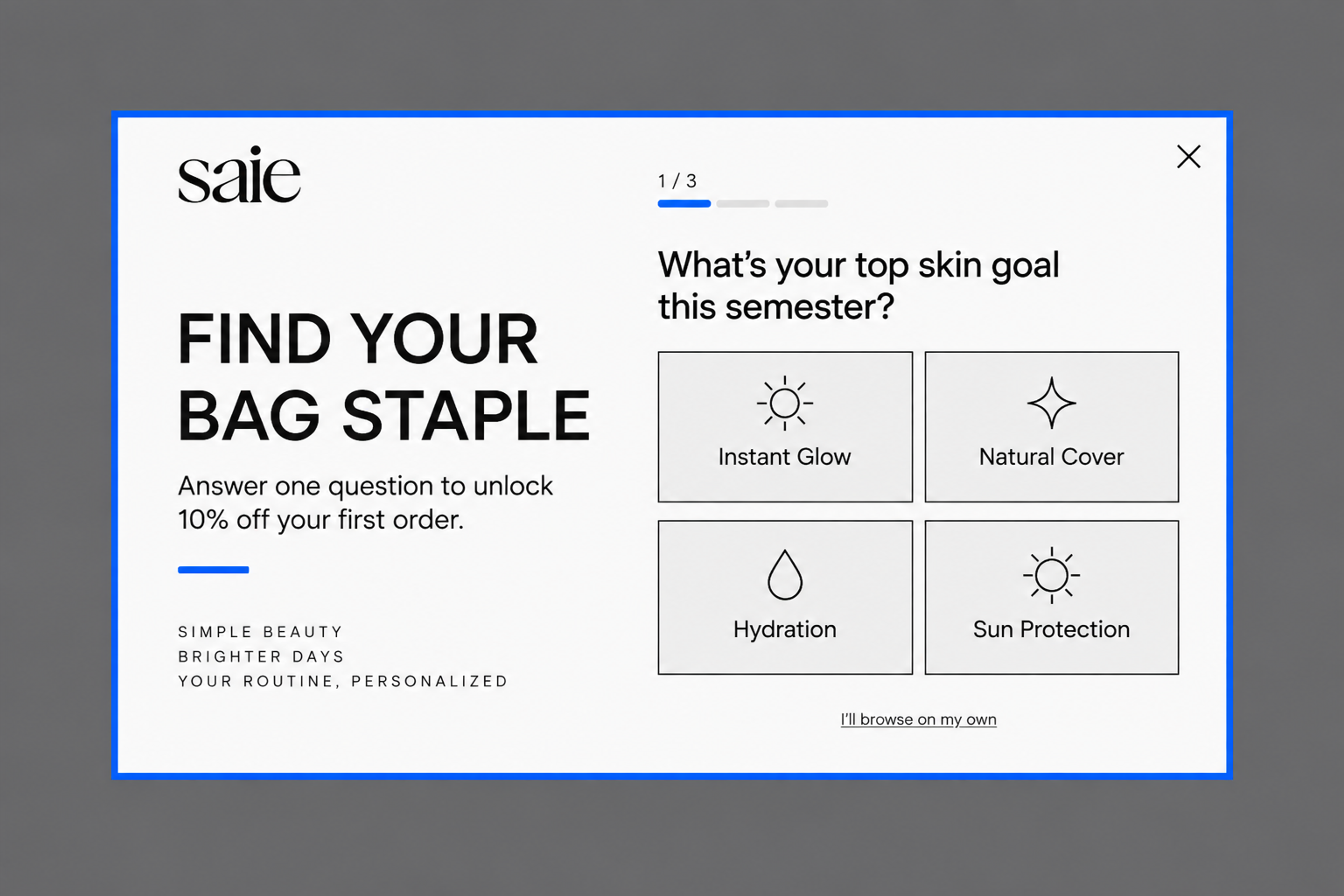
"Find your bag staple": one question about the shopper's top skin goal, with 10% off the first order for answering. The answer puts them in a preference segment on their first visit.
2. The Modern Minimalist (designed for MVMT), for first-time visitors who are leaving
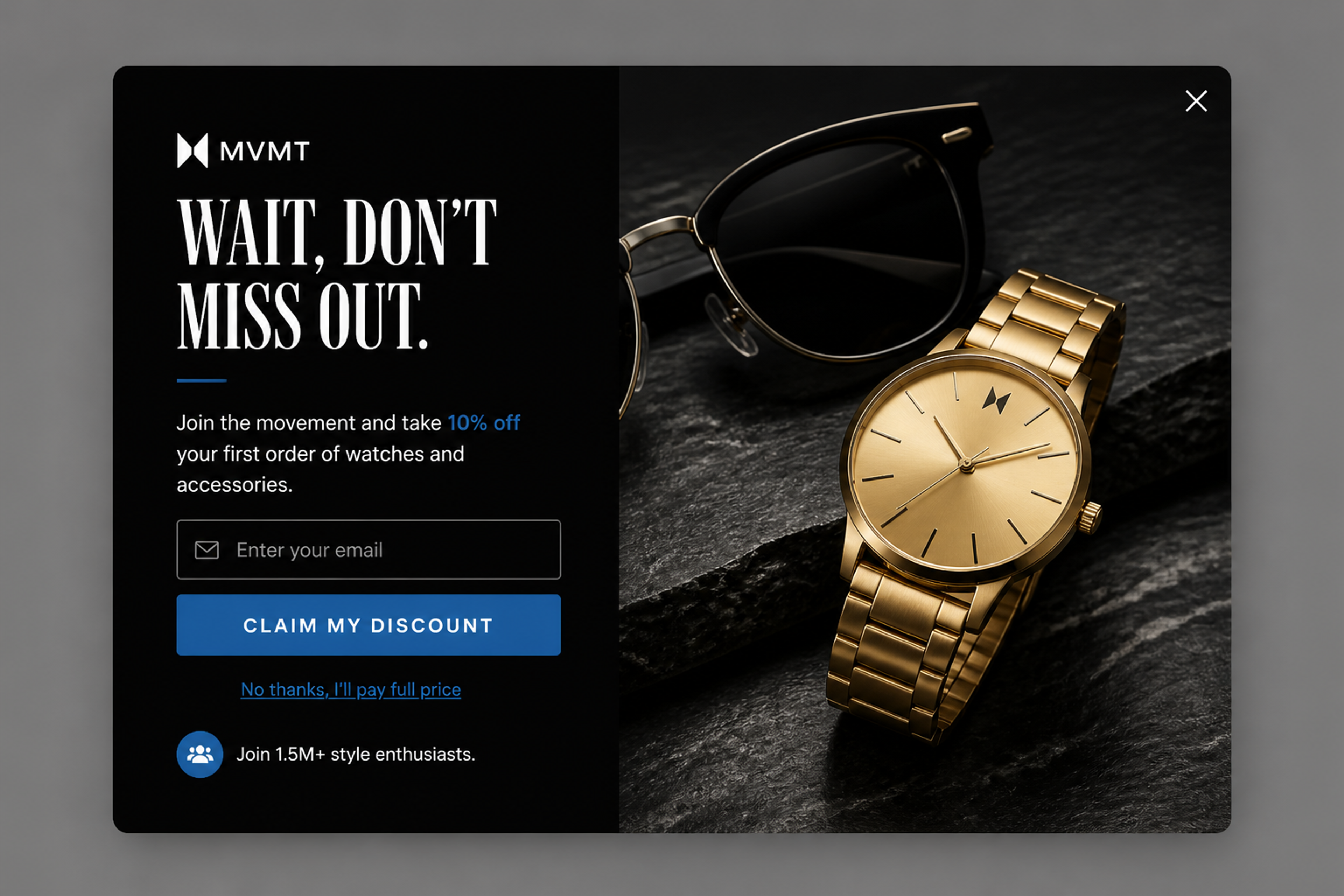
"Wait, don't miss out." An exit-intent offer of 10% off the first order, for an email address. It's for first-time visitors only, with subscribers and customers excluded.
3. The Culinary Nudge (designed for Our Place), for cart abandoners
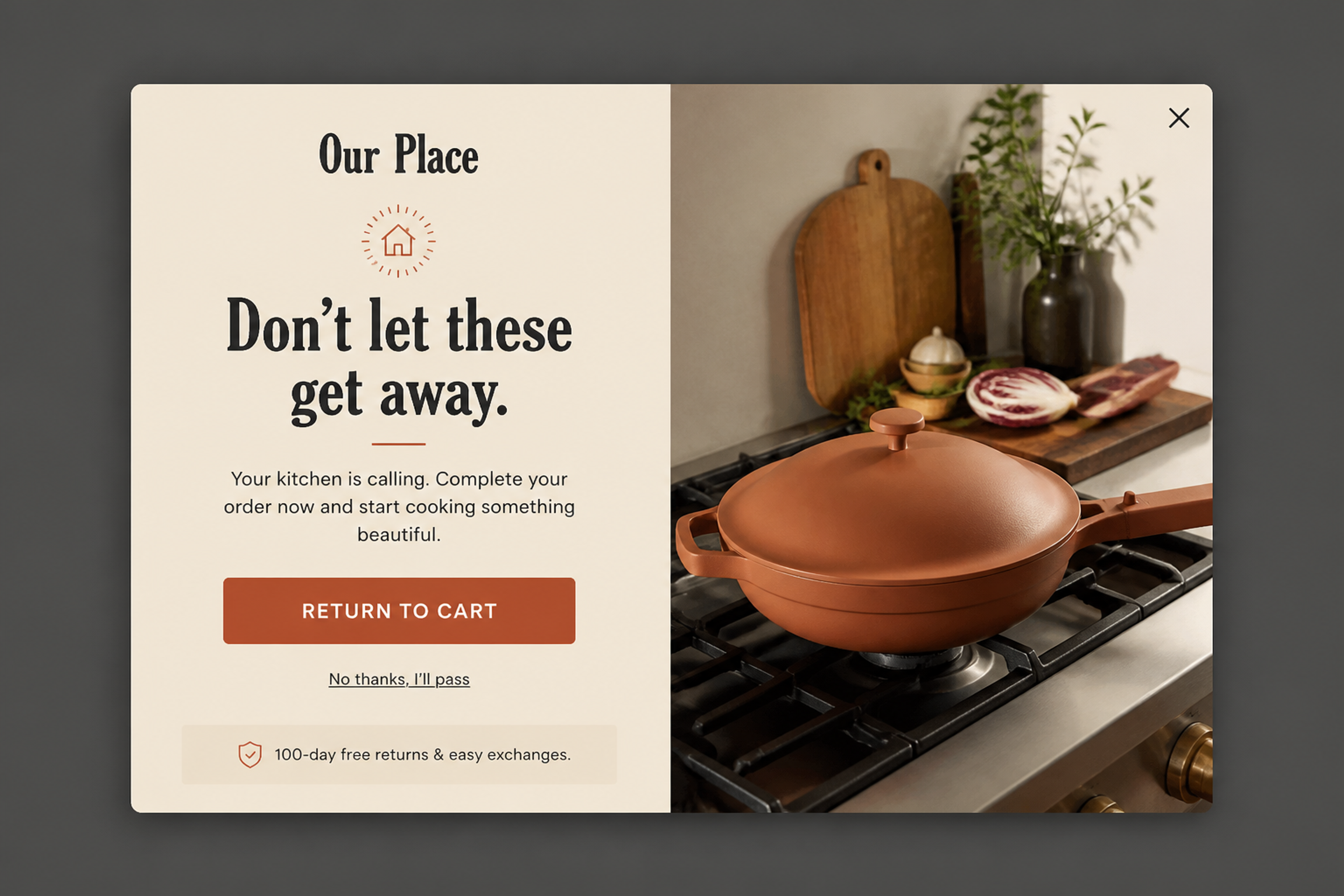
"Don't let these get away." A cart reminder with no code, just a "Return to cart" button and the free returns policy. It suits high-value carts, where a discount gives money away.
4. Typographic Punch (designed for Eat Surreal), for cart abandoners who balk at shipping
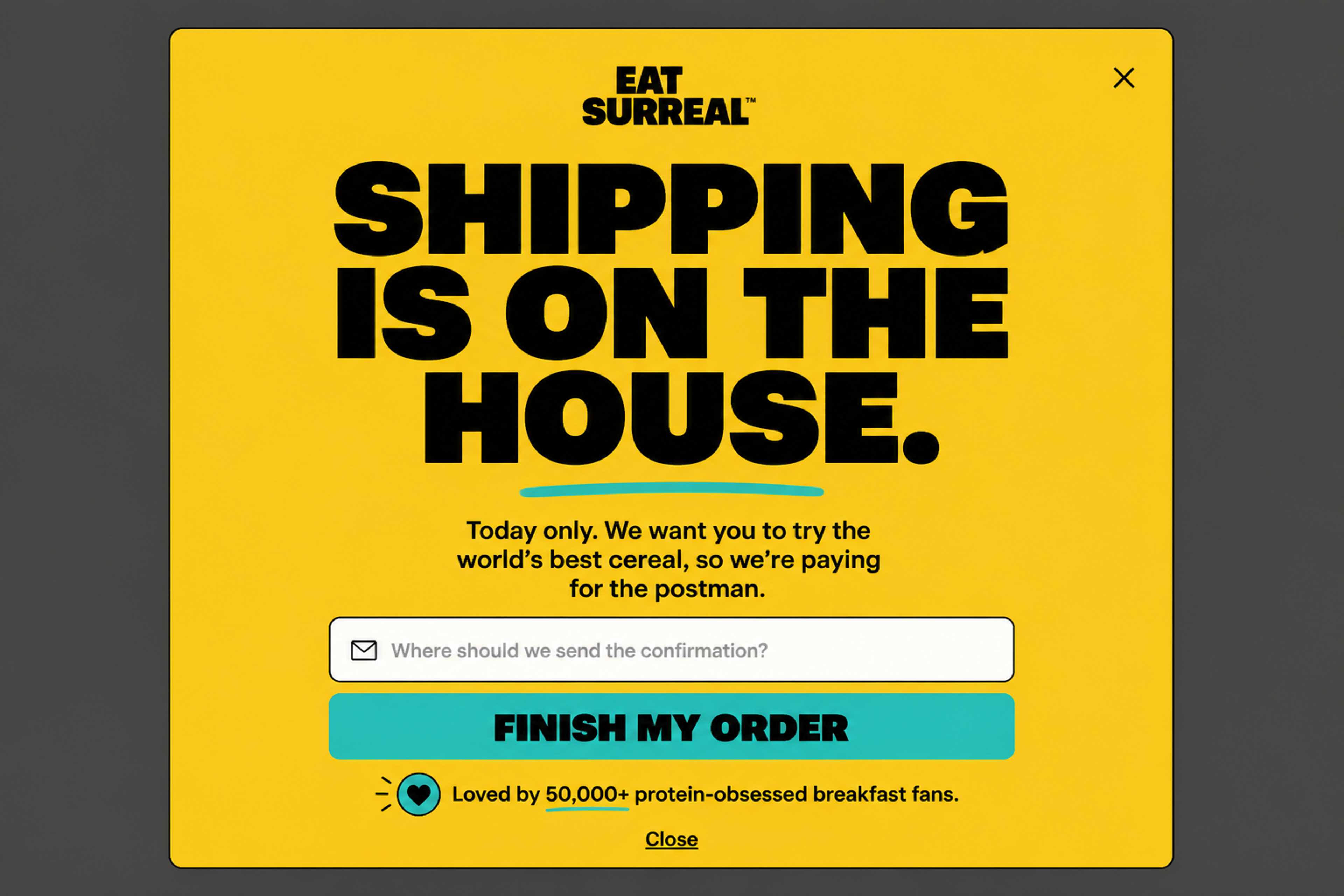
"Shipping is on the house." A free shipping offer with a "Finish my order" button, for carts held back by the shipping cost.
5. The VIP Early Access (designed for Gymshark), for customers and VIPs
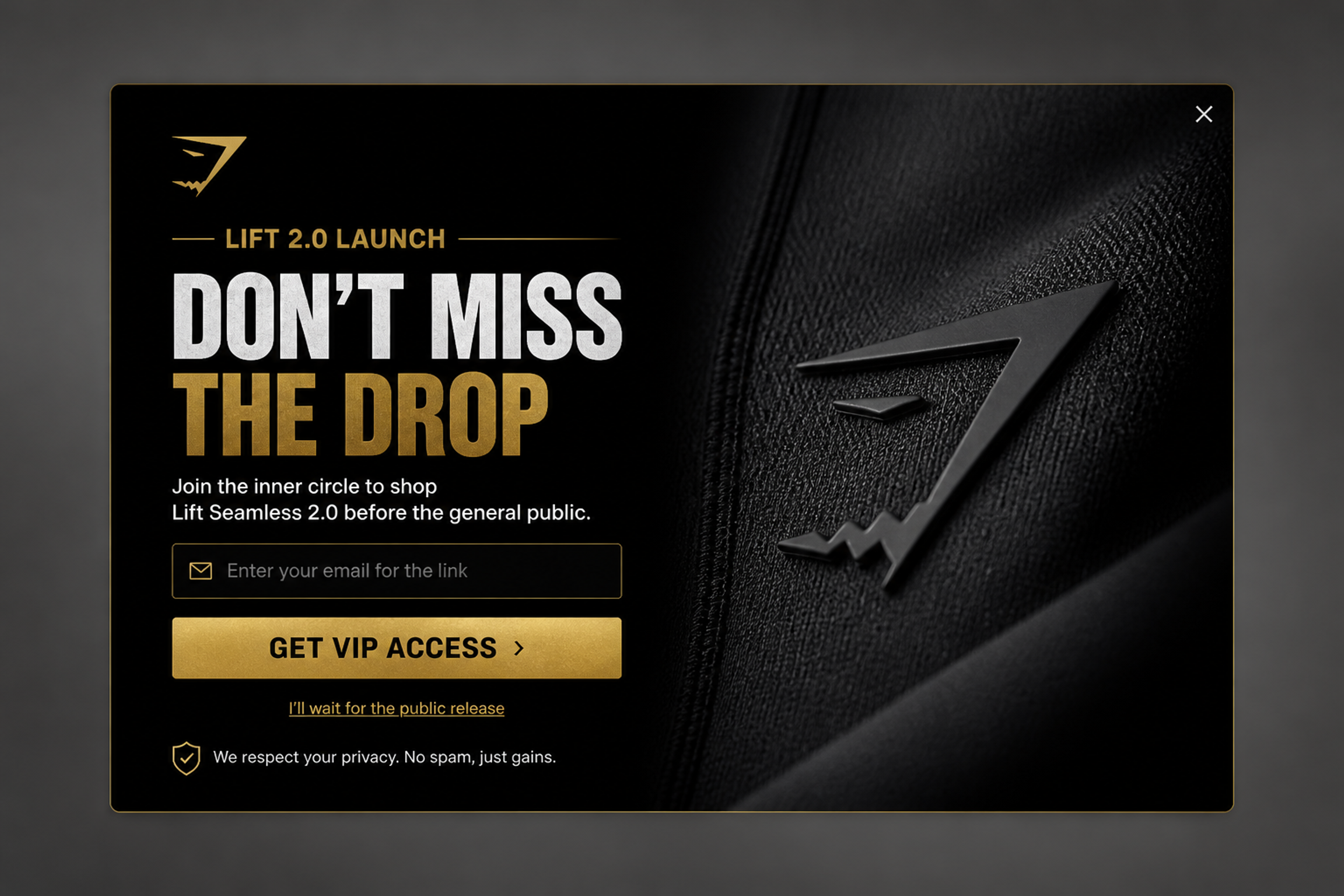
"Don't miss the drop": shop the new collection before the general public. Early access instead of a discount, for your best customers.
In OptiMonk, a segment is the targeting on a popup: you describe who should see it, and the agent sets the rules.
| Segment | Targeting rule in OptiMonk |
|---|---|
| First-time and returning visitors | Returning visitors |
| Product and category browsers | Visited pages and Page targeting |
| Cart abandoners | Cart rules (cart value, number of products, product in cart) |
| Traffic source | Source (Google organic, Google Ads, Facebook, direct, or a custom utm_source) |
| International visitors | Country (are from / are not from) |
| Subscribers | Engaged with OptiMonk campaigns (people who signed up through an OptiMonk popup) |
| Customers and VIPs | Klaviyo lists and segments |
| Preferences | Survey answers and connected campaigns |
More on each rule: returning visitors, cookie targeting, visited pages, cart value targeting, source-based targeting, country targeting, subscriber recognition, Klaviyo lists and segments, survey-based targeting and connected campaigns. Cart rules work automatically on Shopify, WooCommerce and Magento; Klaviyo segments need Klaviyo onsite tracking and your public API key.
Two settings keep overlapping segments in order. Frequency limits stop the same visitor from seeing a popup again and again, and campaign priority decides which popup wins when a visitor fits more than one segment.
You describe the popup in one sentence, for example: "Show visitors from Instagram ads who are new to the store a popup with 10% off their first order, after 5 seconds, not to subscribers." The agent designs it on brand, writes the copy, builds a separate mobile version and sets the targeting.
It doesn't stop at publish. You can A/B test the offer or the design, and run a holdout test against a control group that sees no popup, to see the revenue each segment brings in. You can also build and edit popups from Claude, ChatGPT or Cursor through the OptiMonk MCP server.
Here's the same flow for a country segment: one sentence asking for free shipping over €50 for visitors from Germany.
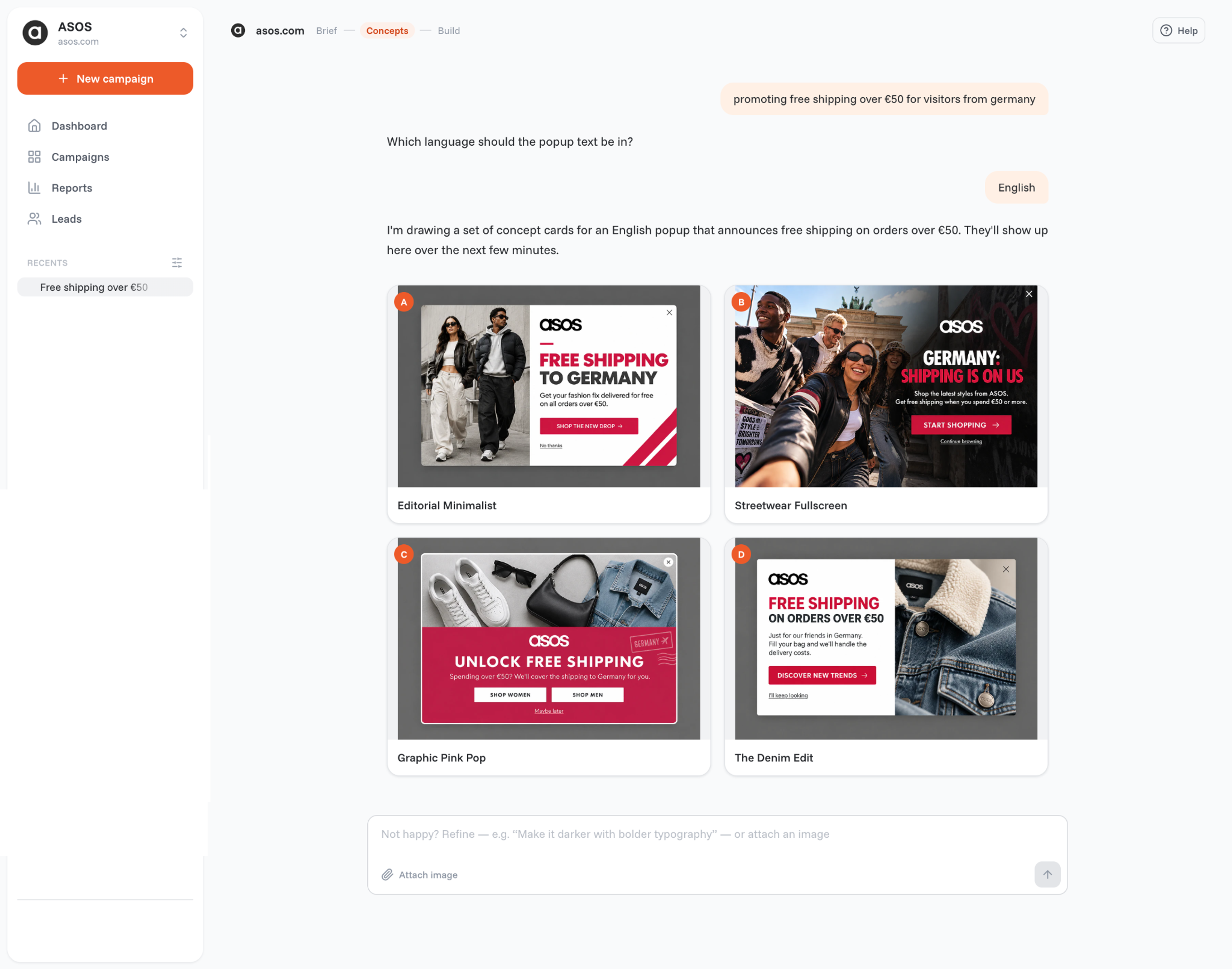
For more popups built for specific groups, see these personalized popup examples.
Most segmentation problems come from building too much, too early:
Ecommerce segmentation is grouping an online store's visitors and customers by a shared signal, such as country, traffic source, pages viewed, cart contents, purchase history or a quiz answer. Each group then gets its own message or offer.
The main types are geographic, behavioral, acquisition source, psychographic, lifecycle, value-based (RFM) and demographic segmentation. The first three work for anonymous visitors; the others need customer data or answers the shopper gives you.
Common examples are first-time visitors, returning visitors who haven't bought, cart abandoners split by cart value, social ad traffic, international visitors, subscribers, VIP customers and shoppers grouped by a quiz answer. Each is one rule, such as "cart value over $100 and exit intent".
Yes. You can group them by country, traffic source, pages viewed, cart contents and number of visits. None of these needs a name or an email address.
Three to five, depending on your traffic. Each segment needs enough visitors to measure the result, so smaller stores should start with fewer.
Segmentation decides who belongs to a group; personalization decides what that group sees. You segment first, then personalize the message for each segment. For more, see these personalization strategies and our ecommerce personalization guide.
Pick the segment from the nine that's closest to money on your store, usually cart abandoners or social ad traffic. Write it down as one rule, and give it one message.
Then describe that popup to the OptiMonk agent in one sentence: it designs it, builds the mobile version and sets the targeting for that segment.
Free to start. No credit card.

What ecommerce personalization is, what our data from 18,000 stores shows, a 5-step strategy and the software you need for each job.
The seven types of website personalization, with real examples from online stores and ideas you can copy.


