


40 Welcome Message Examples for Your Website (Copy and Paste)
40 website welcome message examples for online stores, grouped by situation and industry, ready to copy into a welcome popup.
50 CTA button texts for online stores and popups, grouped by the shopper's moment, plus what makes a button worth clicking.
In short
CTA button examples show how online stores word the one button that matters on a page or popup. Strong button text says what the shopper gets, not what they click, so the next step is clear. Copy a line below, match it to the shopper's moment, then A/B test it.
Most shoppers never read your popup. They glance at the headline, maybe the image, and then their eyes land on the button.
"Submit" and "Get my 10% off" can sit on the same button, in the same color, on the same popup. One asks the shopper to do paperwork. The other promises a reward.
That one line of text carries more weight than anything else on the screen, and it's the easiest thing on your store to change.
A CTA button is the clickable button that asks a shopper to take one step: add to cart, sign up, claim an offer. In online stores the best ones name the result ("Get my 10% off", "Return to my cart"), not the action ("Submit"), and stand alone in a contrasting color.
CTA stands for call to action. In a store you'll find CTA buttons on product pages, in the cart, at checkout, in popups and in emails.
This page is about the words on the button. For the color, see our guide to CTA button colors. Writing for the inbox instead? Our email CTA examples cover that.
A good CTA button tells the shopper what happens after the click, in a few words, and it's the only thing on the screen competing for that click. Everything else is detail.
| Rule | Weak | Better |
|---|---|---|
| Name the result, not the action | Submit | Get my 10% off |
| Say where the click goes | Continue | Return to my cart |
| Keep it short (2–5 words) | Click here to receive your exclusive welcome discount | Send me the code |
| Match the headline's promise | Headline: free shipping. Button: Sign up | Headline: free shipping. Button: Get free shipping |
| One main button per popup | Two buttons: "Yes" and "No" | One button, plus a small text link to close |
| Polite exit line | No thanks, I'll pay full price | Maybe later |
A few more rules behind the table:
For the rest of the popup (headline, body, layout), see popup design best practices.
The buttons below follow the shopper's path through your store, from the product page to the last moment before they leave. Each group says when to use the button and what to put next to it. [product], [Brand], $[amount] and WELCOME10 are placeholders for your own details.
These buttons belong to your store itself: your theme or platform draws them, not a popup tool. They're here because the same rules apply, and because the popups later in this list hand shoppers back to them.
| Button text | Use it when | Pair it with |
|---|---|---|
| Add to cart | The shopper is on a product page and ready to buy | Price, size picker and delivery estimate |
| Add to bag | Your brand speaks fashion or beauty | The same details; pick one wording and use it everywhere |
| Buy now | Express checkout or single-product stores | A short line on shipping and returns |
| Choose your size | The product has variants and none is selected yet | A size guide next to the picker |
| Notify me when it's back | The item is out of stock | An email or SMS field and a restock estimate, if you have one |
| Checkout securely | The main button on the cart page | Payment icons and your return policy |
| Pick up in store | You offer local pickup | The store address and when the order is ready |
| Build your bundle | Bundle or kit pages | The saving the bundle gives |
A sign-up button trades a discount, early access or good content for an email address. The button should name that reward, not the form.
| Button text | Use it when | Pair it with |
|---|---|---|
| Get my 10% off | Welcome offer for first-time visitors | "10% off your first order" in the headline |
| Send me the code | The code arrives by email | "We'll email your code right away" |
| Join the list | There's no discount; news or content is the reward | What subscribers get and how often |
| Text me my discount | The SMS step of a sign-up | A phone field and the consent text |
| Count me in | A casual brand voice, a newsletter or a community | A headline that says what they're joining |
| Get early access | Before a sale or a launch | "Subscribers hear first" |
| Sign me up for drops | Limited releases, streetwear, collectibles | How often you drop |
| Get the [Brand] newsletter | The newsletter has a name and a following | One line on what's in it |
Show it to: new visitors after a few seconds on the site, and never to people who are already subscribers. For headline ideas, see these welcome message examples.
A reveal button turns the discount into a small moment of curiosity. It works when the headline hints at the offer and the click shows it.
| Button text | Use it when | Pair it with |
|---|---|---|
| Reveal my offer | The offer stays hidden until the click | "A welcome gift is waiting" |
| Reveal my code | The next screen shows the code itself | A copy button and the code, e.g. WELCOME10 |
| Claim my $[amount] credit | The offer is a fixed amount, not a percentage | The minimum order, if there is one |
| Get my discount | A plain, direct welcome offer | The discount in the headline |
| Show me my gift | The reward is a product or a sample | A photo of the gift |
| Apply my discount | The code is added at checkout automatically | "No code to copy" |
| Get my first-order deal | First-time buyers only | "For your first order" |
| Use my code now | The second screen, after the code is shown | A link back to the product or cart |
Show it to: first-time visitors. On Shopify, OptiMonk can create unique codes and apply them at checkout automatically, so "Apply my discount" is a promise you can keep.
Free shipping popups work best as a nudge toward a threshold. The button should point to the next step, not to the offer.
| Button text | Use it when | Pair it with |
|---|---|---|
| Get free shipping | The shopper already qualifies | "Your order ships free" |
| Keep shopping | The shopper is close to the threshold | How much is left to spend |
| Add $[amount] for free shipping | You show the exact gap | A product suggestion that fills it |
| Show me what qualifies | You have a collection of items that close the gap | A short list of best sellers |
Show it to: shoppers whose cart value is below your free shipping threshold.
When a shopper with a full cart moves to leave, the button has one job: take them back to where they stopped. Say exactly where.
| Button text | Use it when | Pair it with |
|---|---|---|
| Return to my cart | The cart has items and the shopper is leaving | A thumbnail of what's in the cart |
| Finish my order | The shopper reached checkout and stopped | "Your items are saved" |
| Complete my order | Same moment, a more formal brand voice | Shipping and return reassurance |
| Take me to checkout | You want to skip the cart page | Payment icons |
| Save my cart | The shopper isn't ready to buy today | An email field |
| Email me my cart | The shopper wants a reminder | An email field; your email platform sends the reminder |
| I'm still deciding | You ask what's holding them back | A one-question survey |
| Keep my 10% and check out | You offer a last-minute discount | The code and how long it's valid |
Show it to: visitors with items in the cart, on exit intent. More ideas in our cart abandonment popup examples and abandoned cart coupon code ideas.
An upsell button should be specific: name the product or the price, so the shopper knows exactly what they're adding.
| Button text | Use it when | Pair it with |
|---|---|---|
| Add [product] to cart | You suggest one matching product | A photo and the price |
| Complete the set | The cart has part of a set | What's missing from the set |
| Upgrade to the bundle | A bundle includes what's in the cart | The saving compared to buying separately |
| Add it for $[amount] | The add-on is cheap next to the cart | A one-line reason it fits |
| See what goes with it | You show several matching items | Two or three product picks |
Show it to: shoppers based on their cart contents or the product page they're on. See more in our guide to the upsell popup.
Game buttons invite play first and mention the prize second. After the spin or scratch, the winner screen needs its own button: "Use my prize now".
| Button text | Use it when | Pair it with |
|---|---|---|
| Spin to win | A lucky wheel with several prizes | The prize slices on the wheel |
| Spin the wheel | A calmer brand voice | "One spin per customer" |
| Try my luck | A playful brand | An email field above the button |
| Scratch to reveal | A scratch card | The card itself as the main image |
| Claim my prize | The result screen, when the prize needs an email | The prize in large type |
More formats: gamified popups, the lucky wheel and scratch cards.
Not every CTA needs a discount. For a launch, the reward is getting in first.
| Button text | Use it when | Pair it with |
|---|---|---|
| Get VIP access | Subscribers shop a release before everyone else | The launch name |
| Notify me at launch | The product isn't out yet | An email or SMS field |
| Join the waitlist | Stock is limited | How the waitlist works |
| Shop the drop | The launch is live | A countdown, only if the deadline is real |
Show it to: returning visitors, or visitors who viewed the product pages of the collection.
Every popup needs a way out, and that line is part of your brand too. Pick one that's clear and friendly:
Lines like "No thanks, I'd rather pay full price" try to shame the shopper into clicking. In our view, they make the brand sound pushy at the exact moment you want to be liked, and a shopper who says no today may still buy tomorrow.
The popups below come from the OptiMonk Popup Library. Each one was designed by the OptiMonk agent for a real brand, and you can open it in the library and build your own version. Look at the button and the line under it: they're written as a pair.
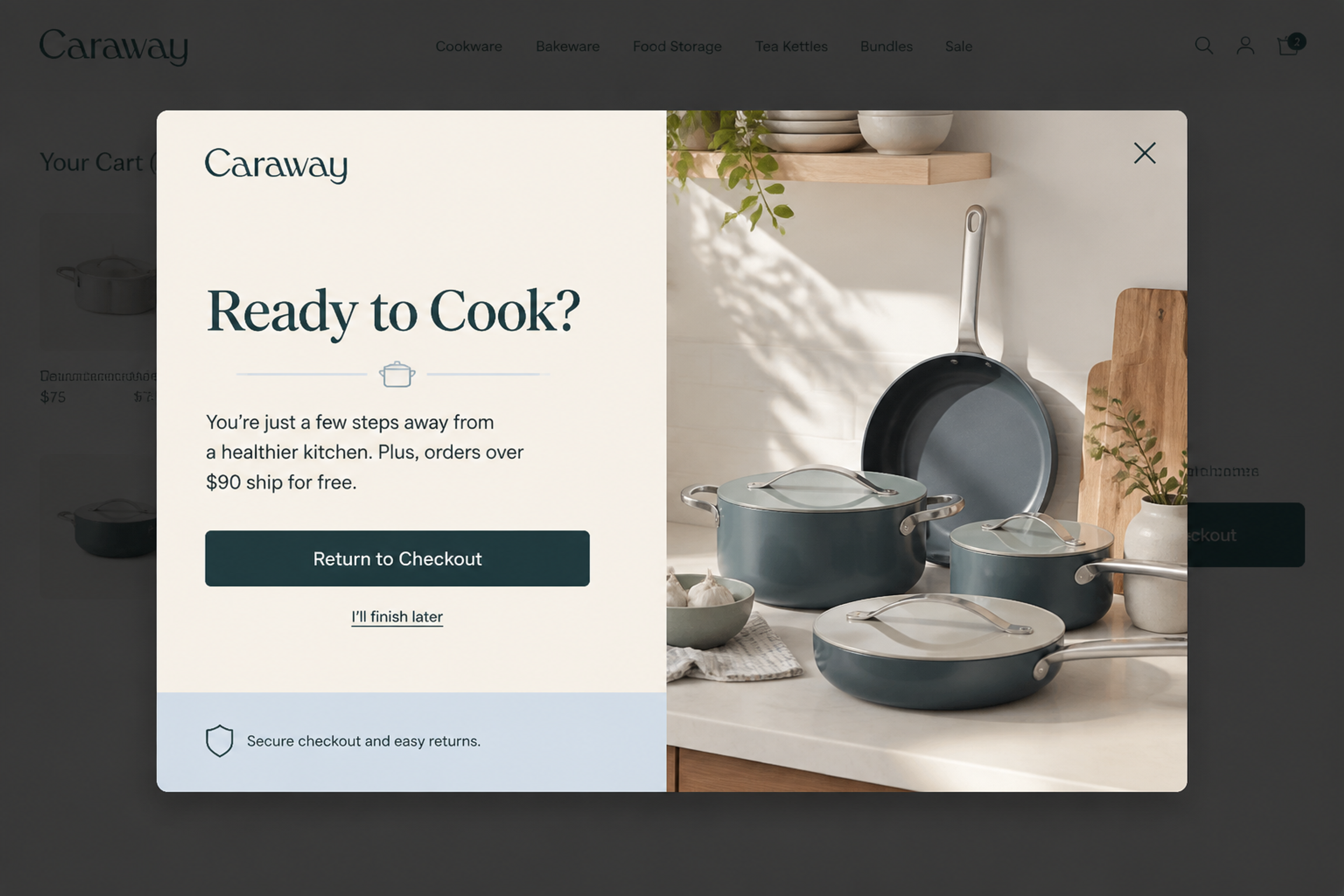
"Ready to Cook?" asks a question, and "Return to Checkout" answers it with the exact place the shopper was heading. The exit line, "I'll finish later", assumes they'll come back. A trust line under the button ("Secure checkout and easy returns") answers the last doubt.
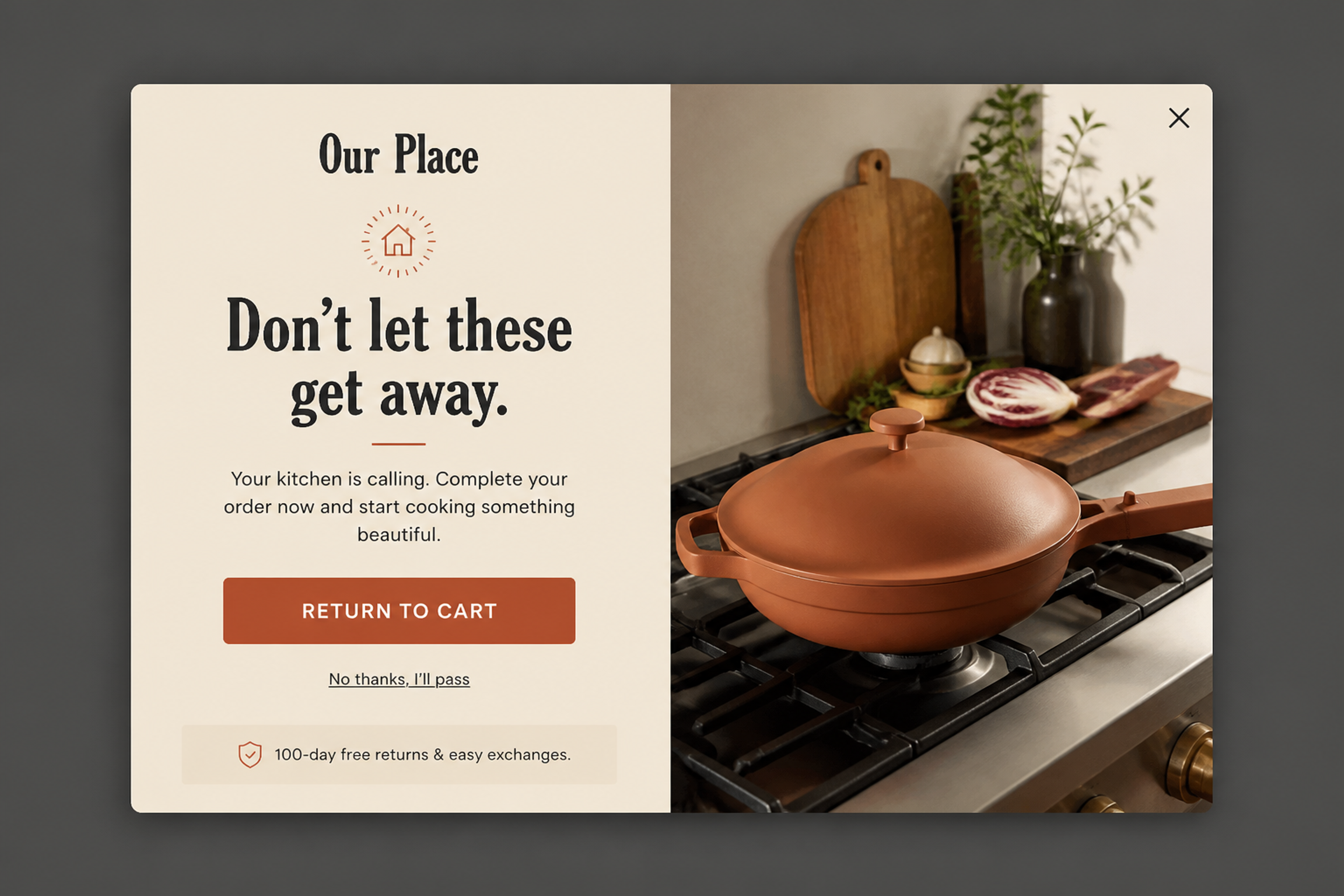
"Don't let these get away." puts the products, not the store, at the center. The button "RETURN TO CART" is short and literal, and the return guarantee under it lowers the risk of clicking.
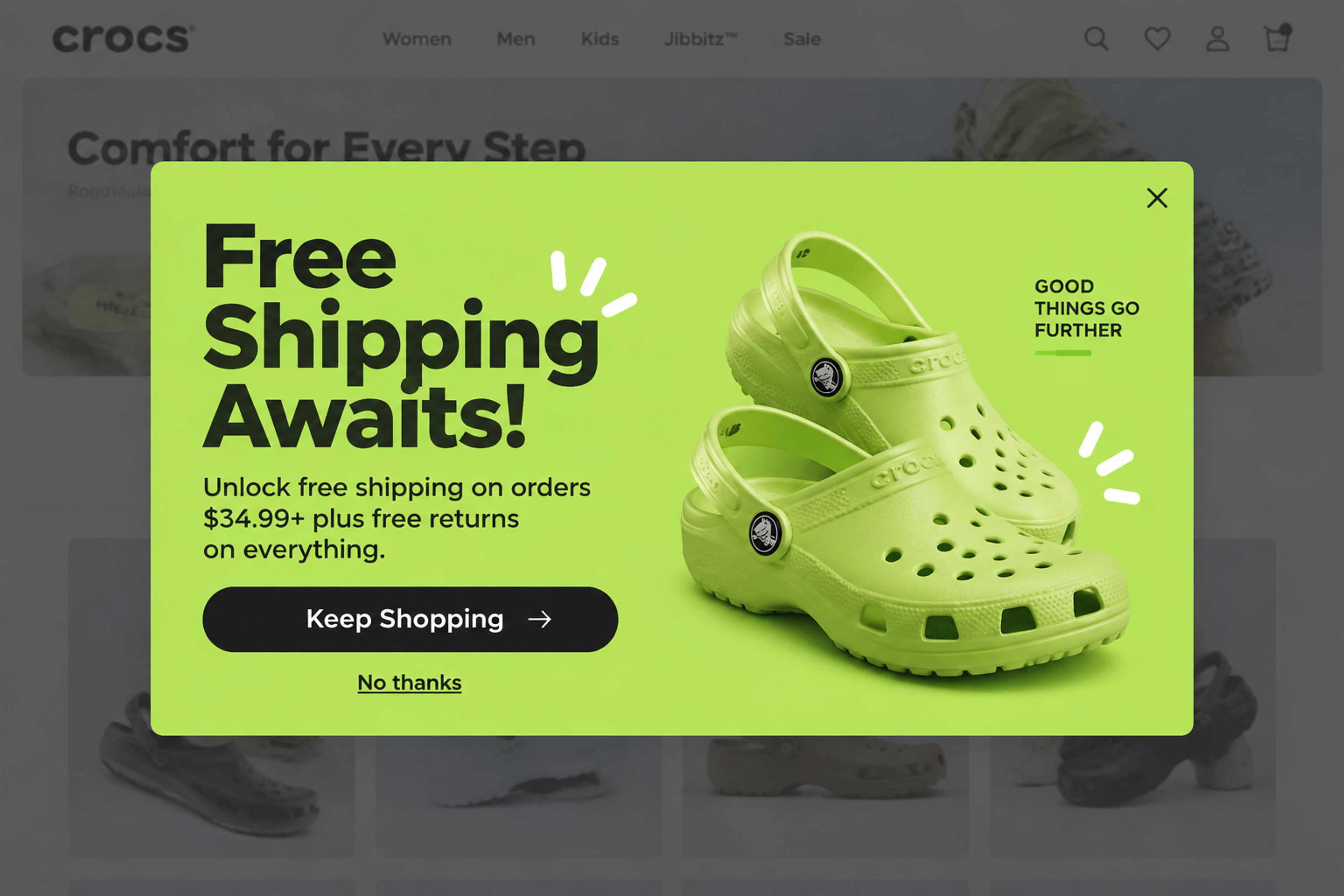
The headline is the offer, so the button doesn't repeat it. "Keep Shopping →" names the next step: add more and the shipping is free. The exit is a plain "No thanks".
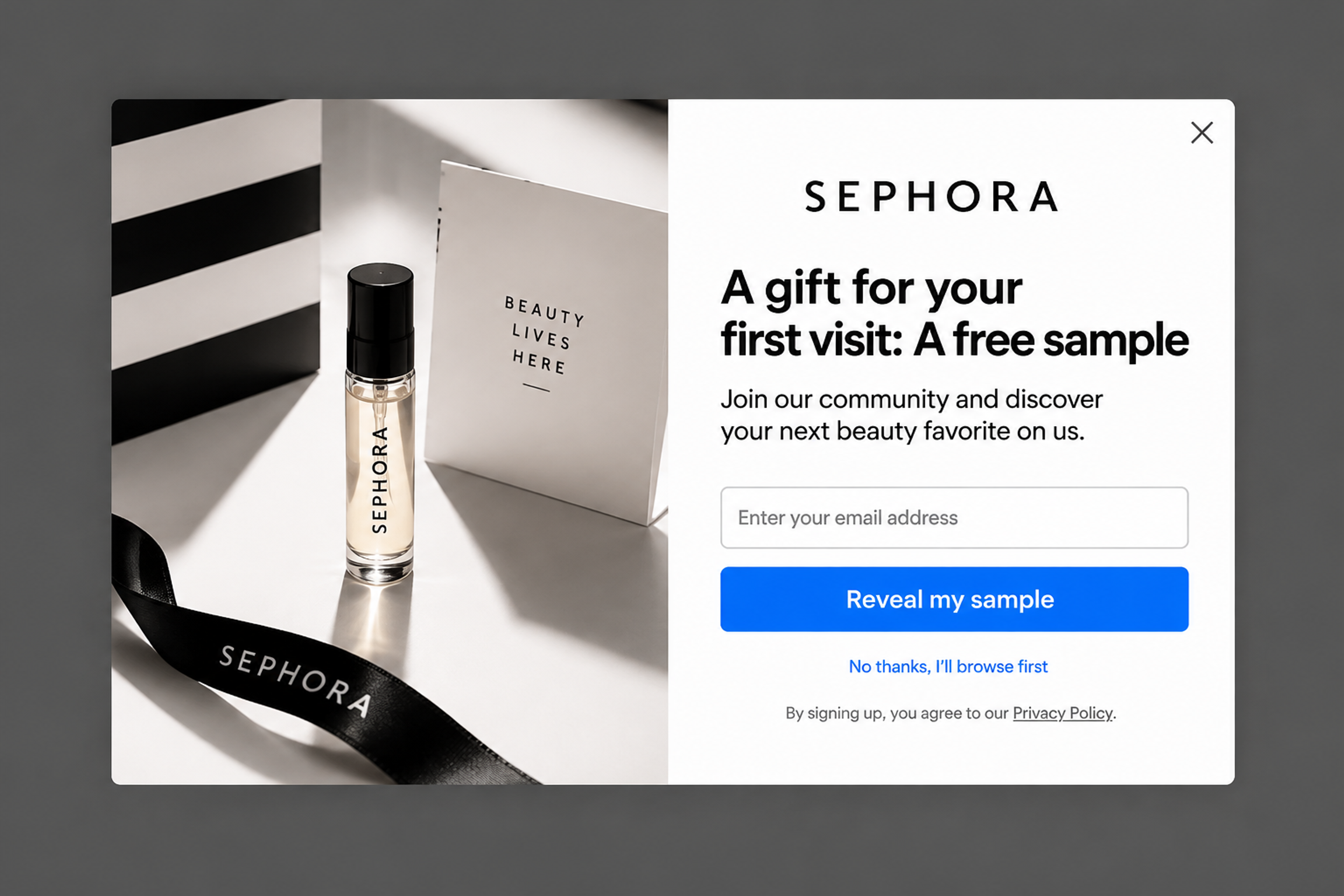
"A gift for your first visit: A free sample" is a welcome offer without a percentage. "Reveal my sample" names the reward and adds a little curiosity, and "No thanks, I'll browse first" lets the shopper leave without losing face.
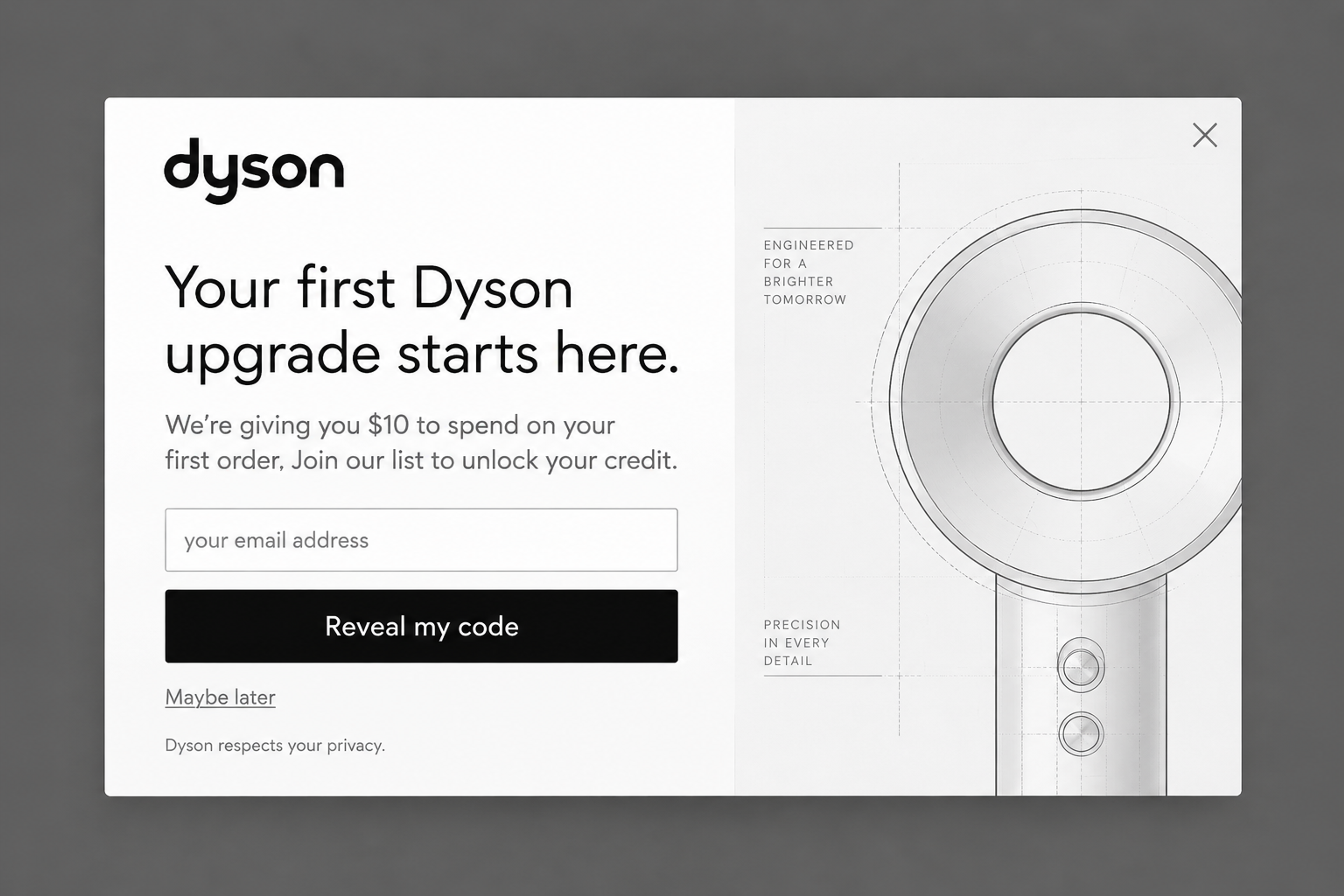
"Your first Dyson upgrade starts here." with store credit as the offer. The design is almost all type: one headline, one button ("Reveal my code"), one quiet "Maybe later". With nothing else on the screen, the decision is easy to make.
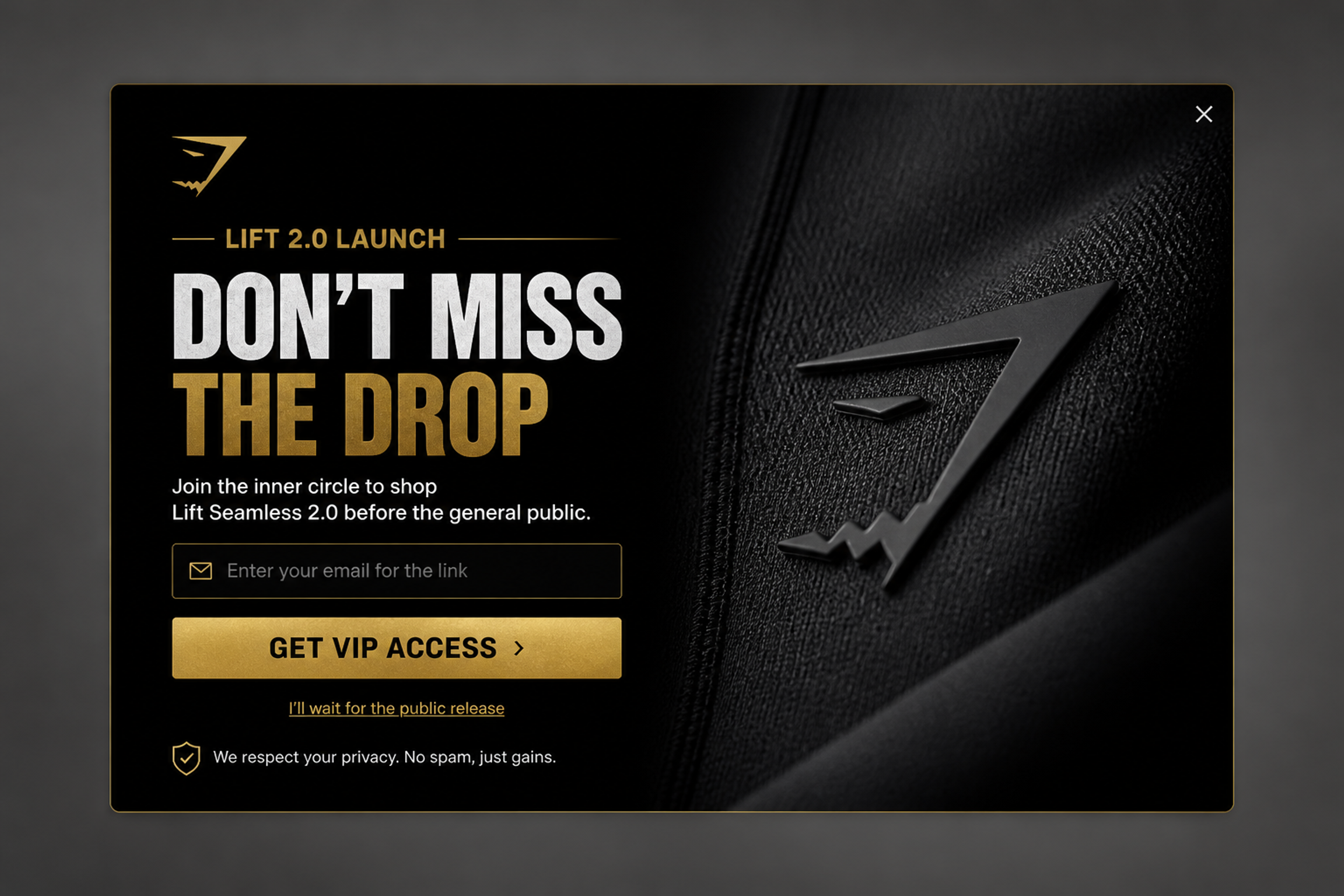
No discount at all: "Don't miss the drop" and "GET VIP ACCESS >" sell getting in first. The exit line, "I'll wait for the public release", is honest about what saying no means without making the shopper feel bad.
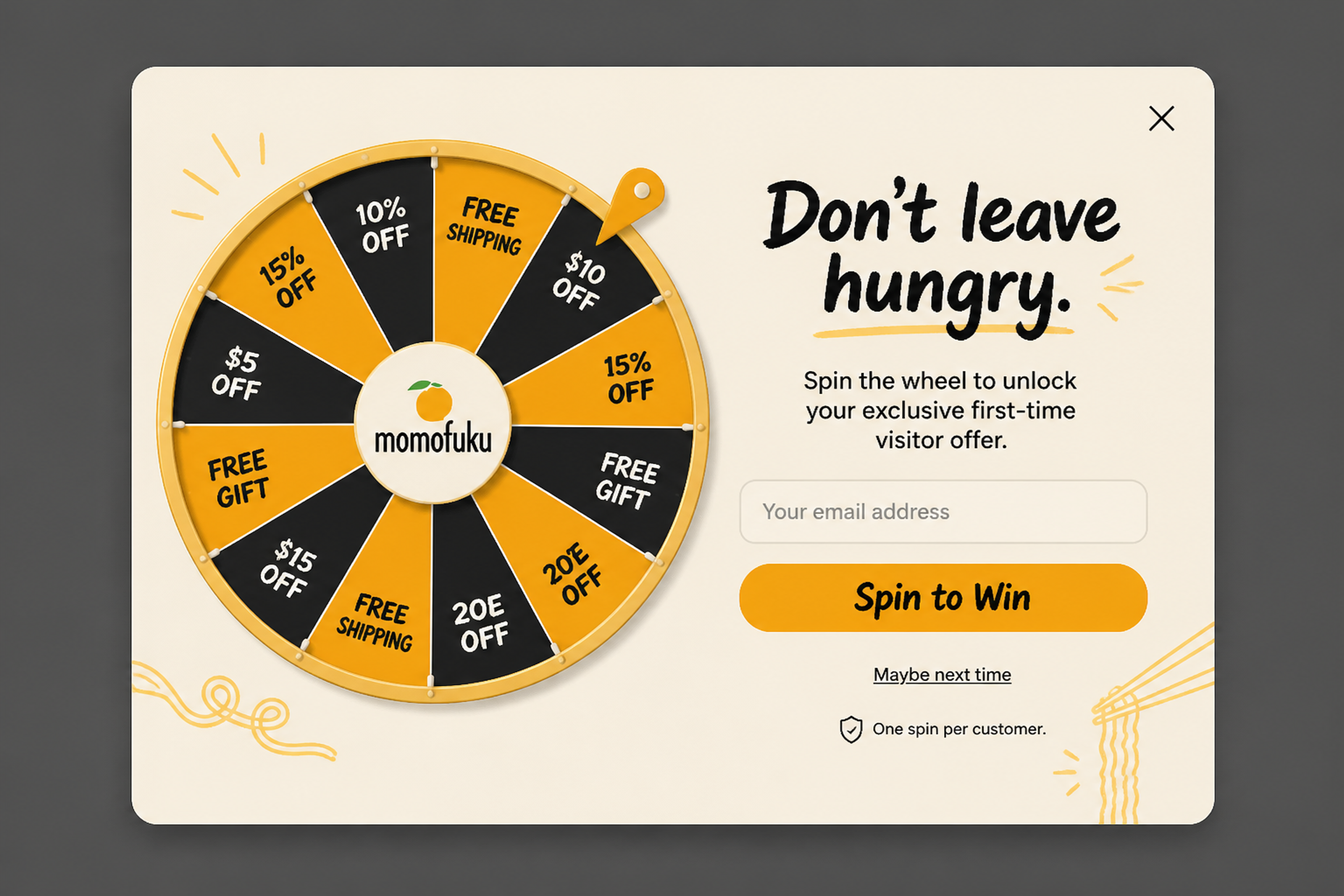
A lucky wheel with a food brand's voice: "Don't leave hungry." The button is the classic "Spin to Win", the exit is "Maybe next time", and "One spin per customer." under the button sets the rules before anyone asks.
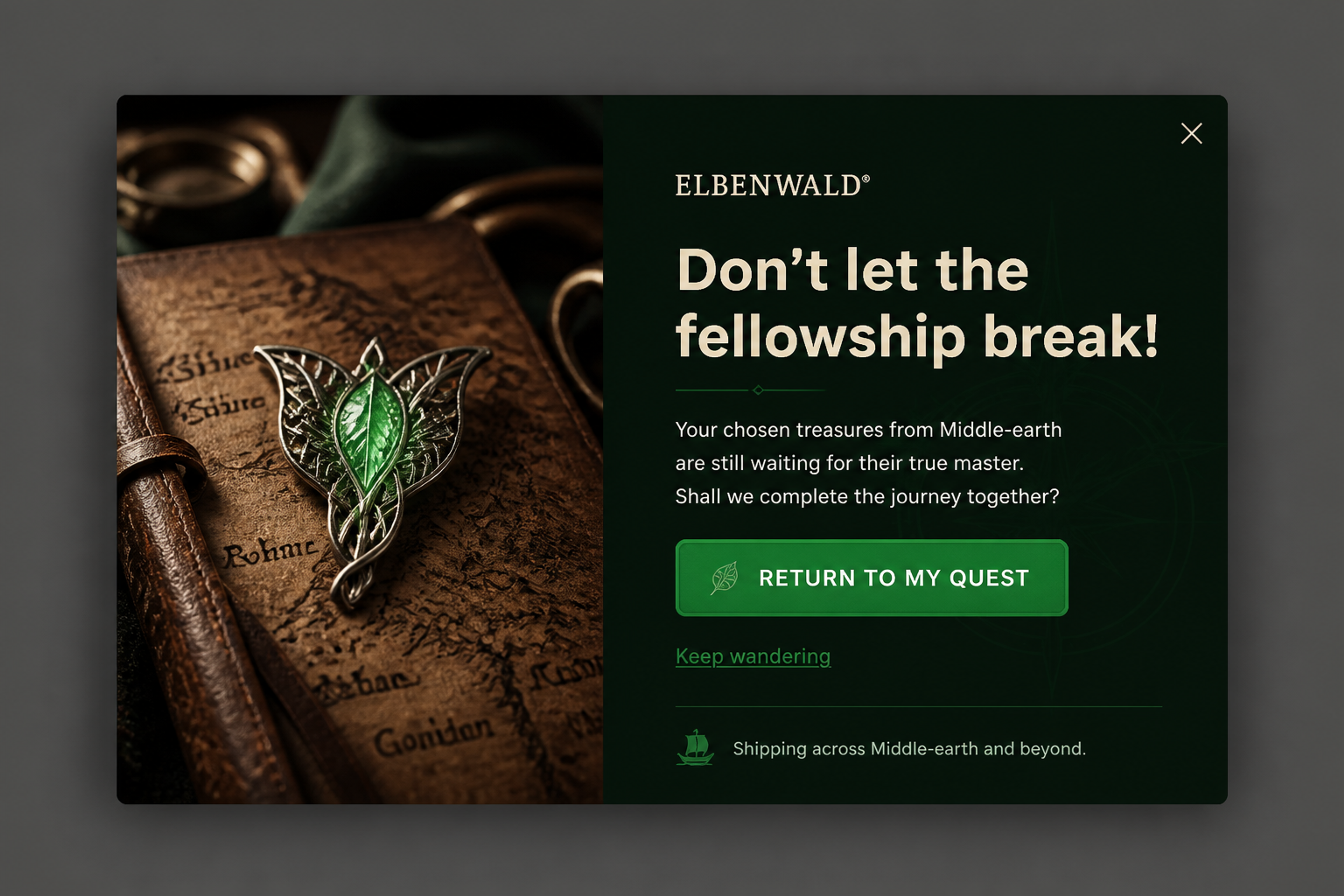
A cart recovery popup for a fantasy merch store: "Don't let the fellowship break!" The button "RETURN TO MY QUEST" is playful, but it still says where the click goes, and "Keep wandering" stays in the same voice. A button can have personality as long as the goal stays clear.
More examples: the cart abandonment and spin-to-win collections in the library.
Put the button under the headline and the form field, so the shopper reads the offer, fills in the field and finds the button right where they need it. Below the button goes the exit line, smaller and as text, not as a second button.
Mobile needs its own layout, not a shrunk desktop popup. The OptiMonk agent builds a separate mobile version of every popup it designs, so the button stays big and easy to tap on a small screen.
If what you need is a button on your page that opens a popup, that's a different setup: see a button that opens a popup. For the words around the button, see our popup message guide.
Don't guess which button wins: run an A/B test. Show half your visitors "Get my 10% off" and the other half "Reveal my offer", and let the conversions decide.
You can test more than the words:
A holdout test goes one step further: it keeps a group of visitors who see no popup at all, so you can see whether the popup adds orders. Set a conversion goal that matches the button (a signup, an order) and check the revenue analytics, not just the clicks.
For the full method, see our guide to A/B testing popups and the variant A/B testing feature.
With OptiMonk you don't write the button on its own. You describe the popup in one sentence, for example:
"Show first-time visitors 10% off with code WELCOME10 after 5 seconds, button text 'Get my 10% off', not to subscribers."
The agent designs the popup on brand, writes the copy with the button and the exit line, builds a separate mobile version and sets the targeting. In the same conversation, you can ask it to A/B test the button text and roll out the winner. Below, the agent's first four concepts for a different brief, an exit-intent free shipping popup, each with its own button and exit line.
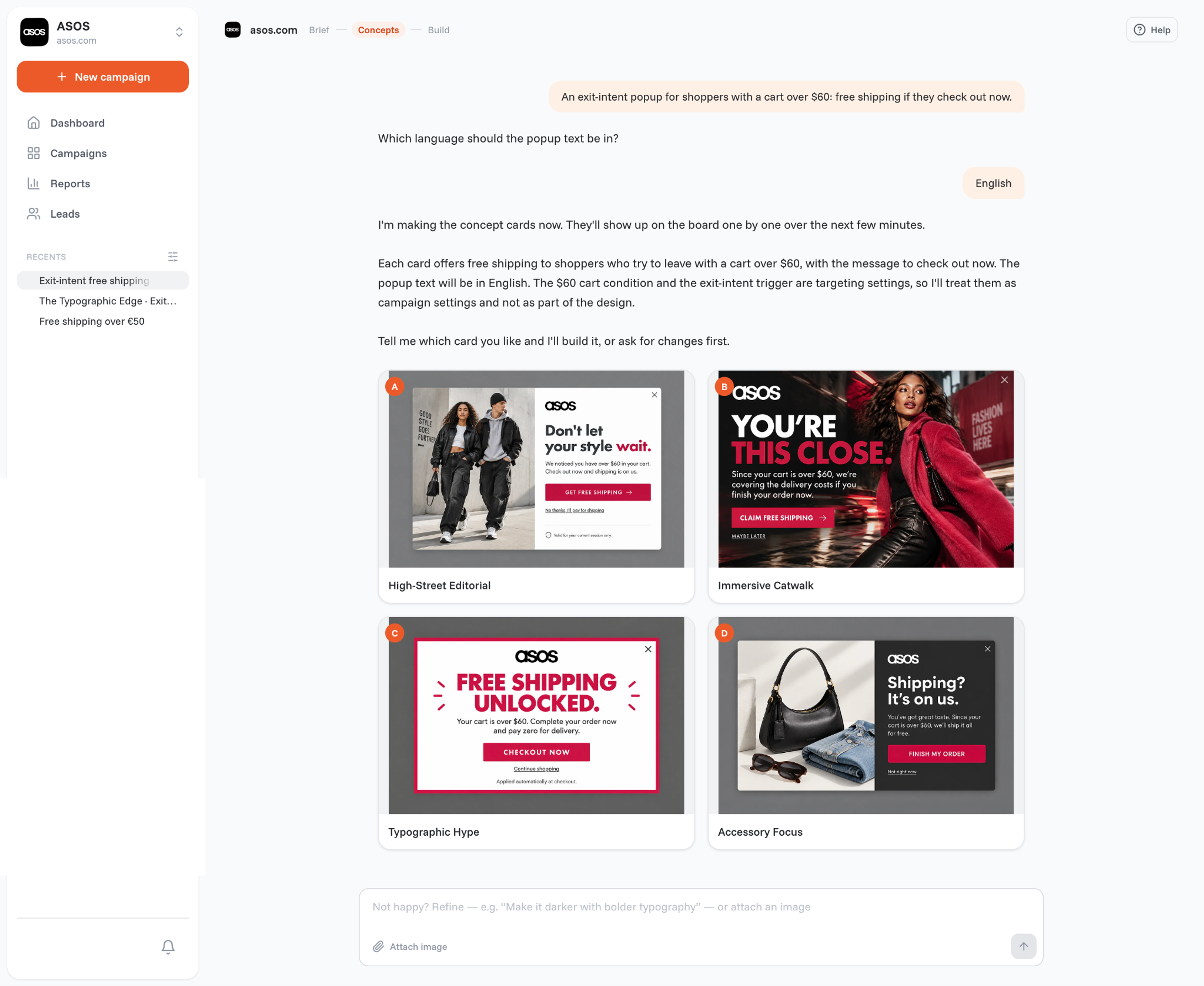
It works for card popups, fullscreen popups, lucky wheels and scratch cards. On Shopify, it can also create unique discount codes that apply at checkout automatically. For exit-intent campaigns, see exit-intent popups.
CTA stands for call to action. In marketing, a CTA is any prompt that asks someone to take the next step, such as a button, a link or a line in an ad. On a store, it's usually a button: "Add to cart", "Get my 10% off", "Return to my cart".
One that names what the shopper gets or where the click takes them. "Get my 10% off" beats "Submit", and "Return to my cart" beats "Continue". Match it to the moment: sign-up, offer, cart recovery or upsell.
Two to five words is a good range. Start with a verb and add the result: "Send me the code", "Finish my order". If you need more words, put them in the headline or under the button.
Both can work. First person ("Get my discount") reads like the shopper's own words, and many CRO writers prefer it. The only way to know for your store is to A/B test the two versions.
It can, but it usually shouldn't. One main button keeps the decision simple; the way out works better as a small text link than as a second button. If you want to offer two different things, build two popups and target each one to the right visitors.
Pick the one popup on your store with the weakest button, often a sign-up popup that still says "Submit", and rewrite it with a line from this page. Then A/B test the new text against the old one.
For a new popup, describe it in one sentence and the OptiMonk agent designs it, writes the button and the exit line, builds the mobile version and sets the targeting.
Free to start. No credit card.


40 website welcome message examples for online stores, grouped by situation and industry, ready to copy into a welcome popup.
12 Christmas popup examples for online stores, from welcome offers and spin-to-win wheels to gift quizzes and last-chance countdowns.
In this article, we'll share the best alternatives to Sleeknote that help you to get more leads in 2026.


