


Black Friday Marketing Strategy: 30 Ideas for 2026
In this article, we'll share 30 actionable Black Friday marketing ideas for ecommerce businesses to make 2026 your most successful yet.
What lead capture is, how a lead capture system works for online stores, which forms and offers convert, and 8 popup ideas to copy.
In short
Lead capture turns store visitors into email and SMS subscribers you can reach again, since most won't buy on their first visit. Give them a clear reason to sign up, ask for one field, show it at the right moment, send signups to your email tool and keep testing.
Lead capture is how an online store collects a visitor's contact details, usually an email address or phone number, so it can follow up later. A lead capture system has five parts: an offer worth signing up for, a short form, the right moment to show it, a connection to your email or SMS tool, and ongoing A/B tests.
This guide covers each part for an online store, with eight popup ideas you can copy and a checklist for choosing lead capture software.
Lead capture is the moment a visitor hands over their contact details in exchange for something they want. For an online store, that's usually an email address or phone number traded for a discount, free shipping or a chance to win.
Most visitors leave without buying. Across online stores, the average conversion rate is 2.68%, so fewer than 3 in 100 visitors place an order (Dynamic Yield's ecommerce benchmarks, past 12 months, October 2026). A captured email or phone number gives you a way to reach the rest again, with a welcome series, a cart reminder or your next sale.
Lead capture is often confused with lead generation. They are two halves of the same job:
| Lead generation | Lead capture | |
|---|---|---|
| The job | Bring the right people to your store | Collect contact details from the people who are already there |
| Channels | Ads, SEO, social, influencers, email | Popups, signup forms, quizzes, checkout |
| What you measure | Visitors, traffic sources, cost per click | Signup rate, list growth, revenue per subscriber |
| What it hands over | A visitor | A subscriber you can contact again |
Lead generation fills the store. Lead capture makes sure the visit doesn't end with nothing.
A lead capture system is the set of parts that turns an anonymous visitor into a contact in your email or SMS tool. Each part can fail on its own, so it helps to treat them as one system rather than one form.
The offer is the reason to sign up. A first-order discount, free shipping, a giveaway entry or a personalized product recommendation all work; "Sign up for our newsletter" on its own rarely does.
The form is where the visitor types their details. For most stores, one field (email) is enough on the first step, with the phone number asked on a second step.
The trigger decides when the form appears: after a few seconds, after some scrolling, or when a visitor is about to leave (exit intent). Targeting decides who sees it: first-time visitors, people on a certain page, people from a certain traffic source, or everyone except existing subscribers.
The lead capture integration sends each new contact to the tool you use to follow up: Klaviyo or another email/SMS platform, or a CRM. OptiMonk connects to 60+ tools, including Klaviyo, Mailchimp, Omnisend, HubSpot, Attentive and Postscript, and to anything else through Zapier or webhooks. Without it, contacts sit in an export file and the welcome email never goes out.
A/B testing tells you which offer, copy or design brings in more subscribers. The first version is a starting point; the system improves as you test.
Lead capture forms come in a few formats. The right one depends on where the visitor is and how much you want to ask.
| Form type | Where it shows | Best for |
|---|---|---|
| Card popup | A centered box over the page | Welcome discounts, list building on any page |
| Fullscreen popup | Covers the whole screen | A strong first impression, launches, big sales |
| Lucky wheel / scratch card | A popup with a game | Turning a discount into a moment people want to take part in (gamification) |
| Quiz / survey (multi-step) | A popup that asks one or two questions first | Product recommendations, segmenting subscribers by interest |
| In-page signup form | In the footer or on a landing page | Visitors who scroll to the bottom or arrive from a campaign |
OptiMonk builds popups: card popups, fullscreen popups, lucky wheels, scratch cards and surveys. See examples of email popups and gamification popups. For in-page signup forms, use your store theme or email tool. For form examples by format, see our lead generation forms and popup forms guides.
The offer does most of the work, so choose it before you design anything. These are the offers online stores use most:
Which one wins for your store is a question for an A/B test, not a rule. For more ideas, see these lead magnet examples.
These ideas come from the OptiMonk Popup Library. Each one was designed by the OptiMonk agent for a real store's brand; open it in the library to see the details.
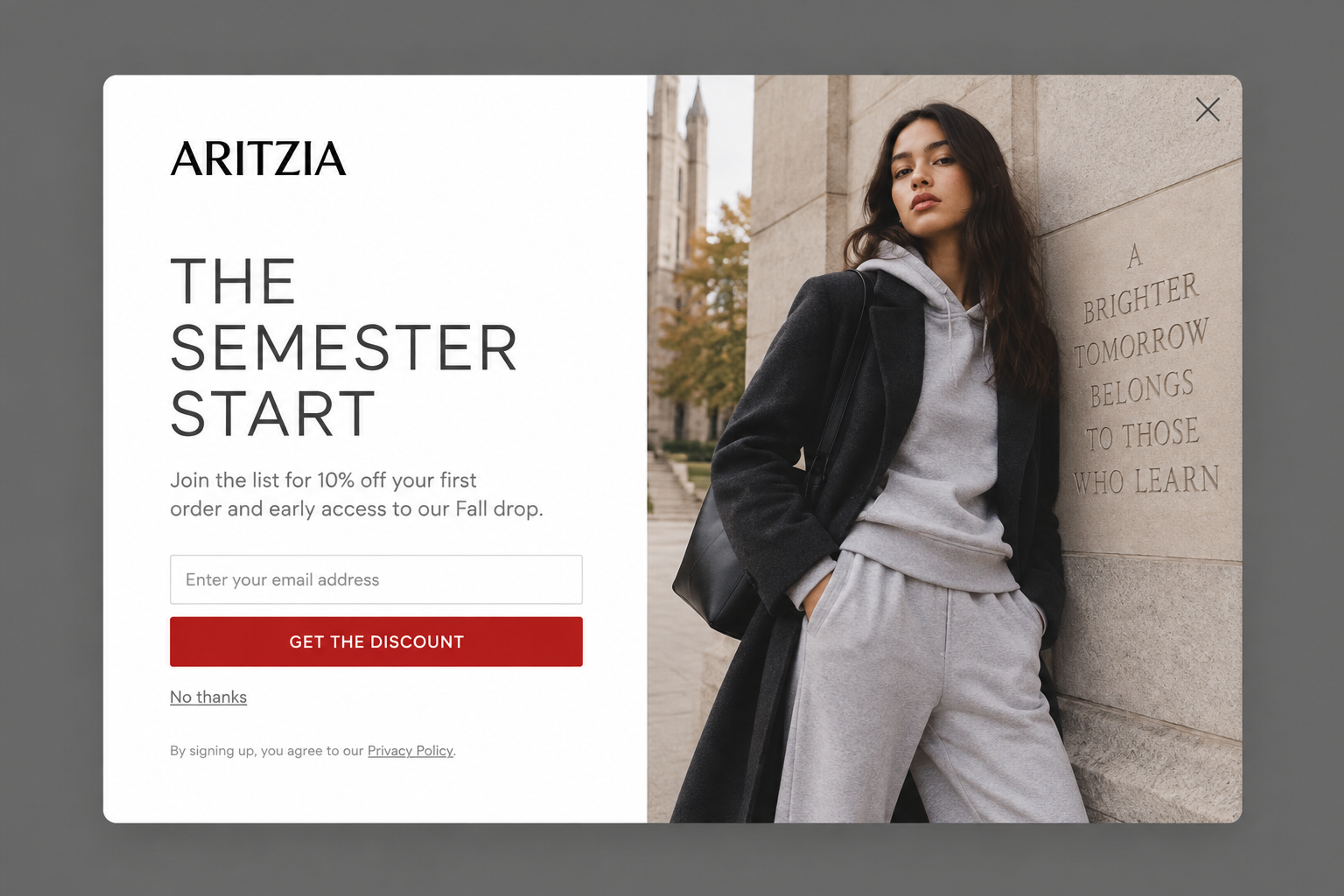
A split layout: copy on one side, a fashion photo on the other. It asks for one thing (an email) and gives two: 10% off the first order and early access to the next drop. Show it to first-time visitors after a few seconds of browsing.
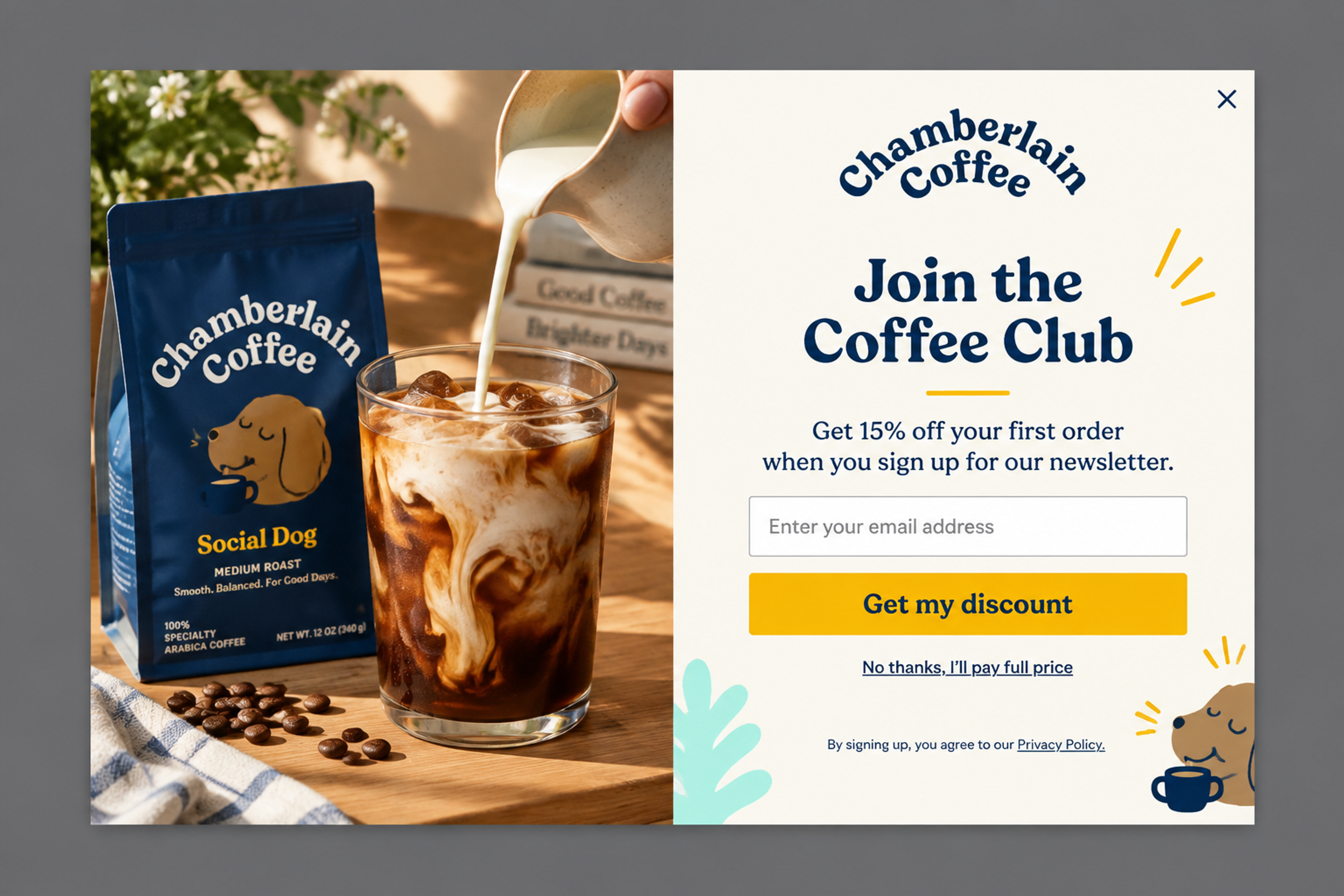
"Join the Coffee Club" frames the newsletter as a club, not another inbox subscription, and pays for it with 15% off the first order. The lifestyle photo shows the product at home. It fits a welcome trigger on any page.
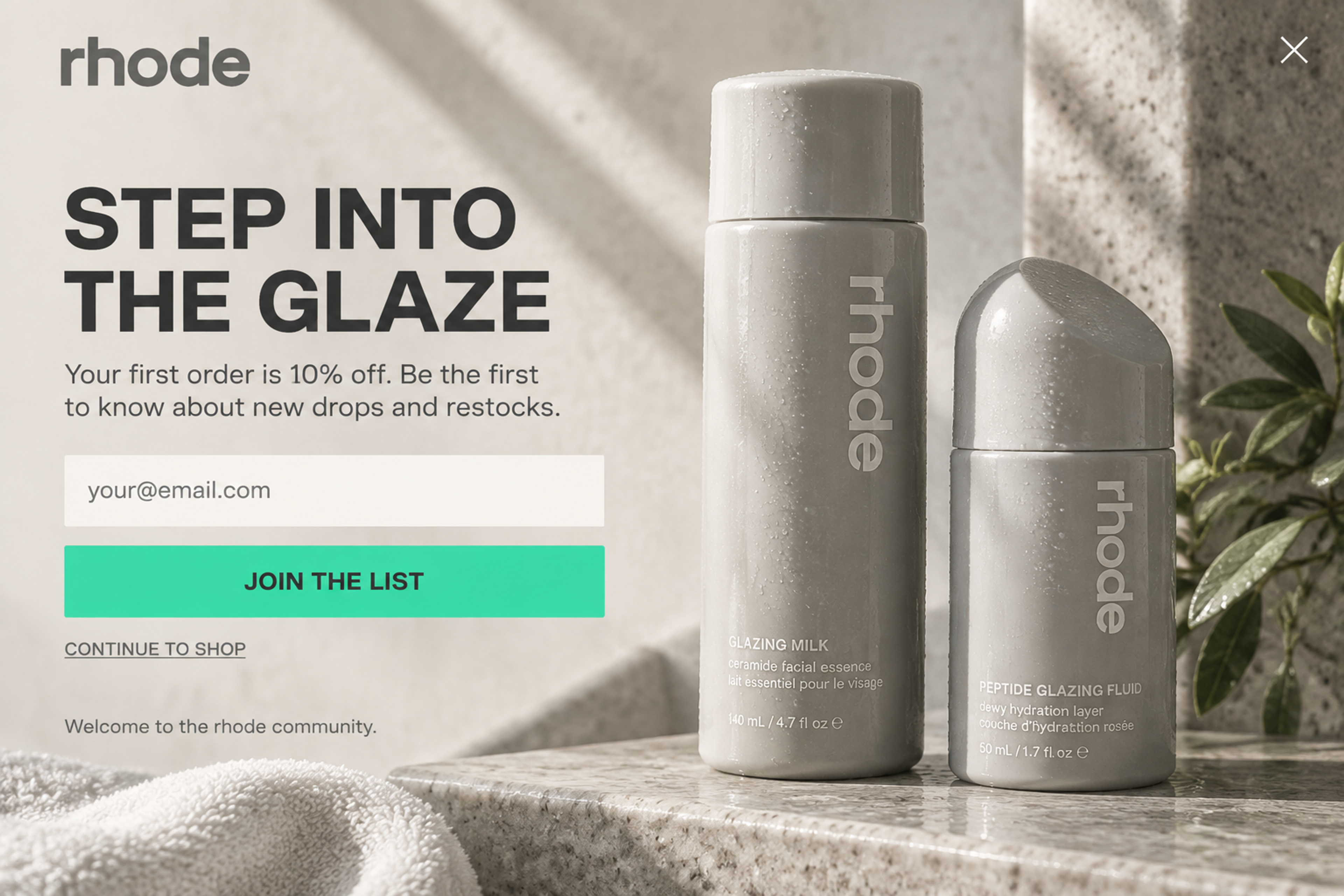
A fullscreen welcome: a product still life fills the screen, and the form floats on top. The offer is 10% off plus news about drops and restocks. Because it covers the page, give visitors a moment on the site first, and keep the "Continue to shop" link easy to find.
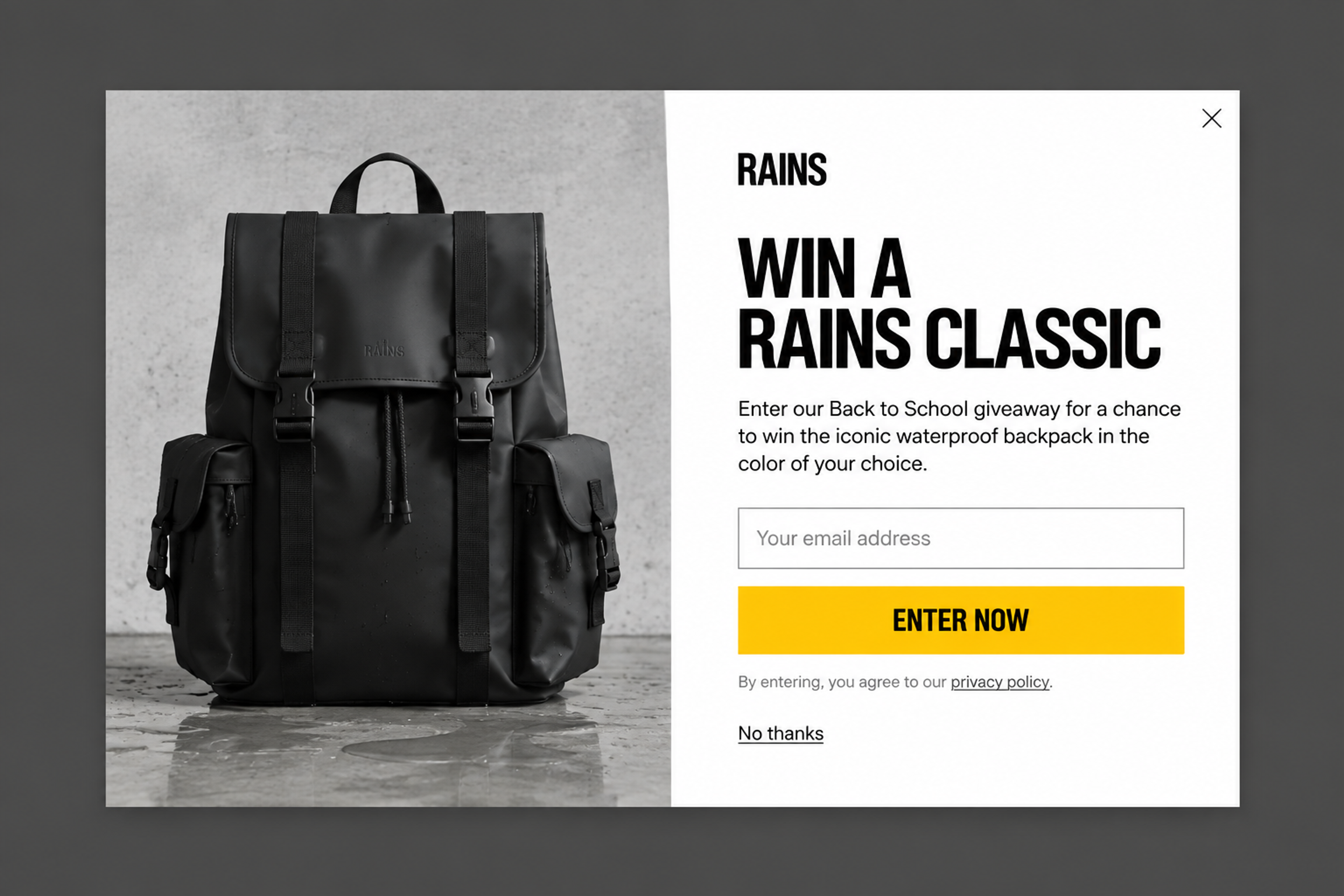
A giveaway instead of a discount: enter your email for a chance to win the brand's best-known backpack. It protects the margin and still gives visitors a reason to sign up. It works on exit intent for visitors who browsed but didn't buy.
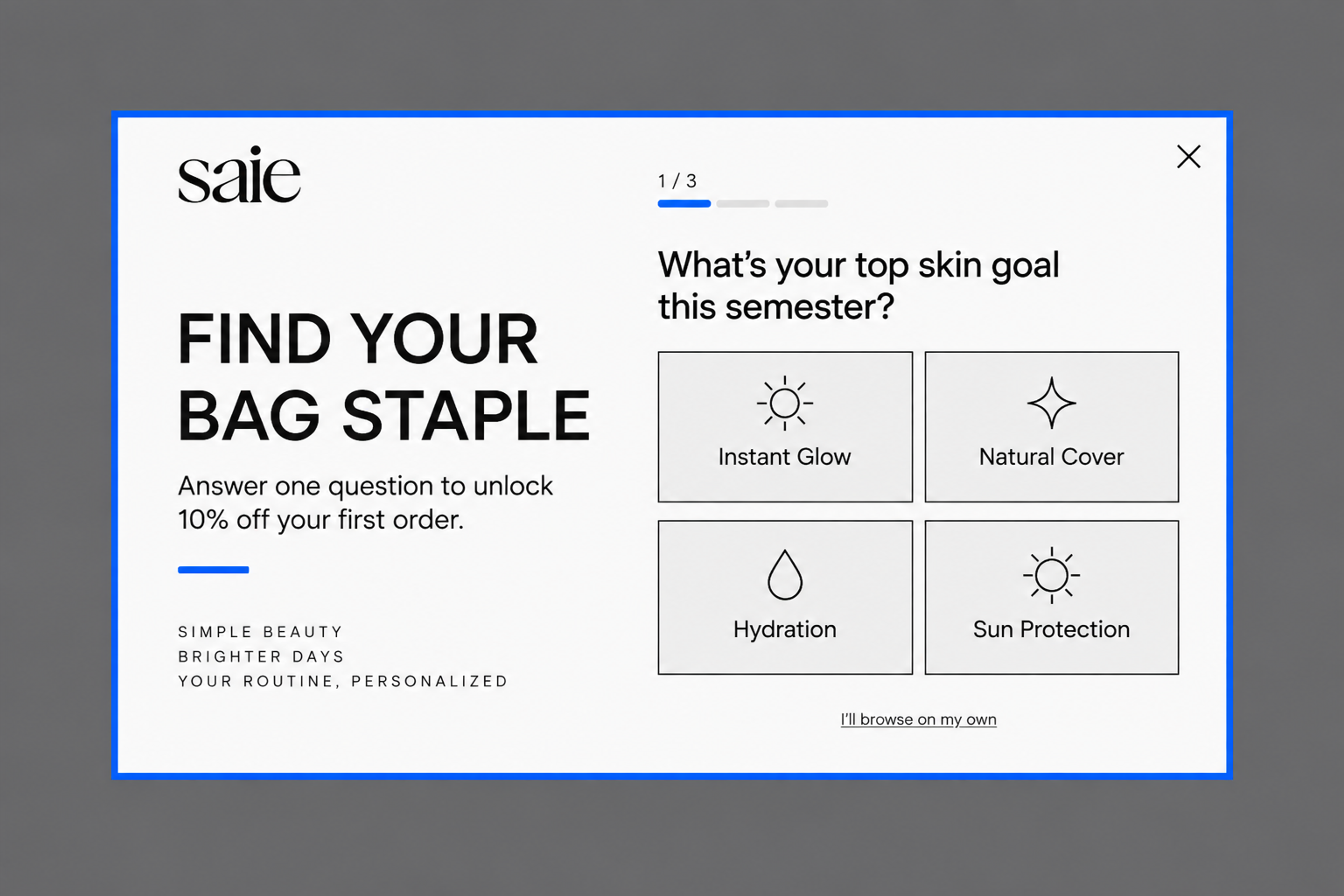
One question first ("What's your top skin goal?"), then the email field, then 10% off. The answer tells you what the subscriber cares about, so your first email can match it. More: quiz popups.
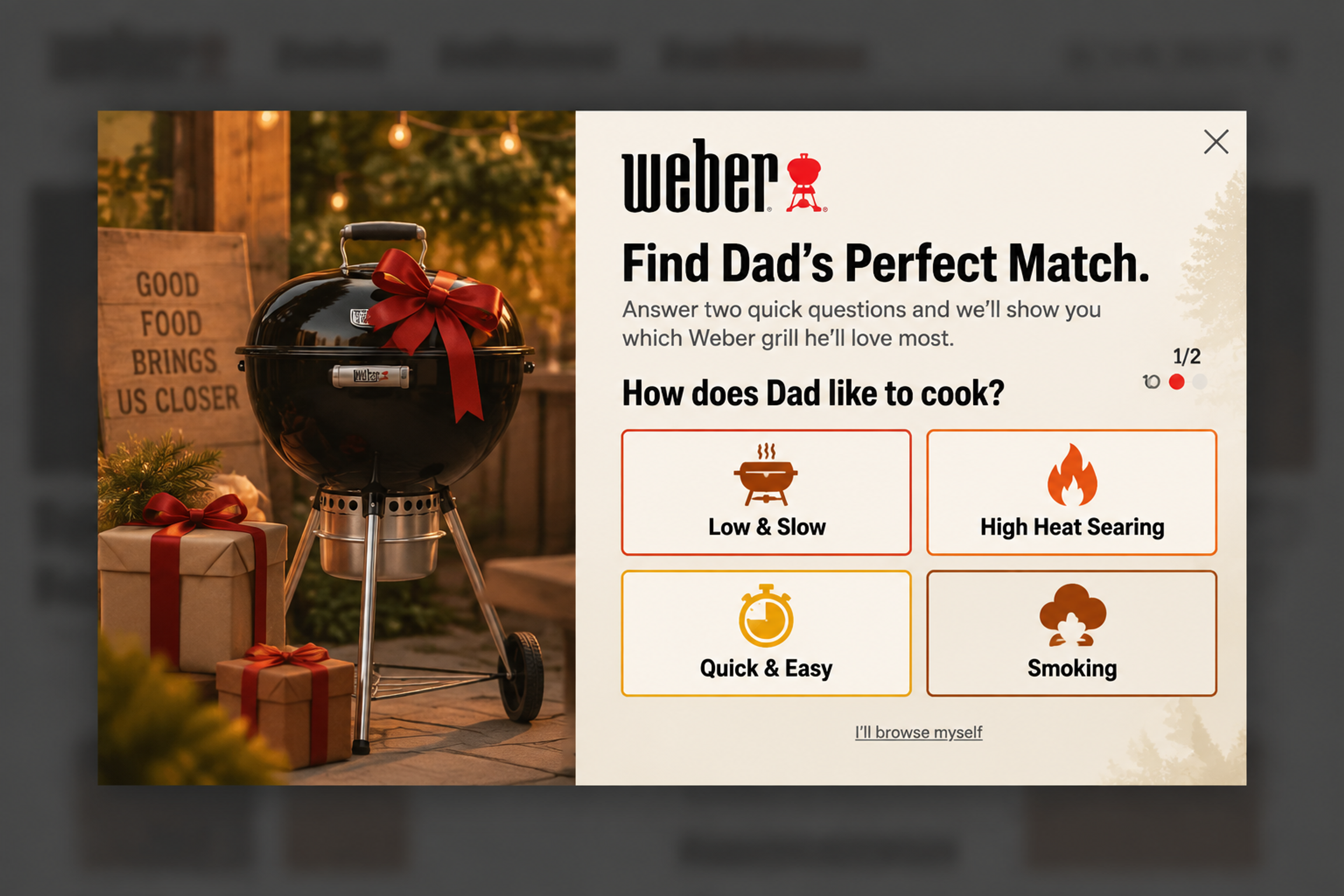
A gift finder with no discount at all: two quick questions, then "Where should we send the results?" The personalized guide is the offer. It suits high-priced products, where shoppers want advice more than a code.
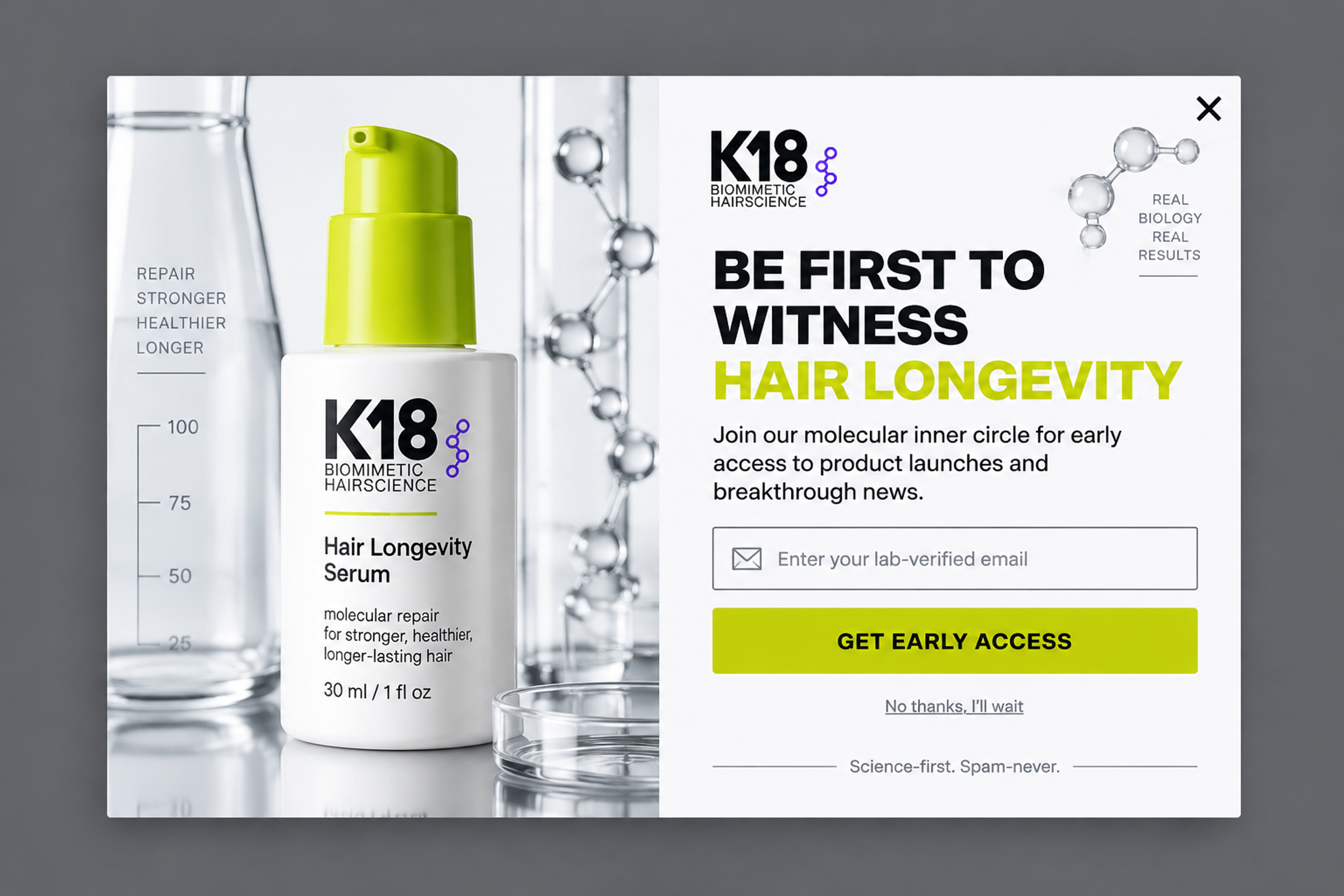
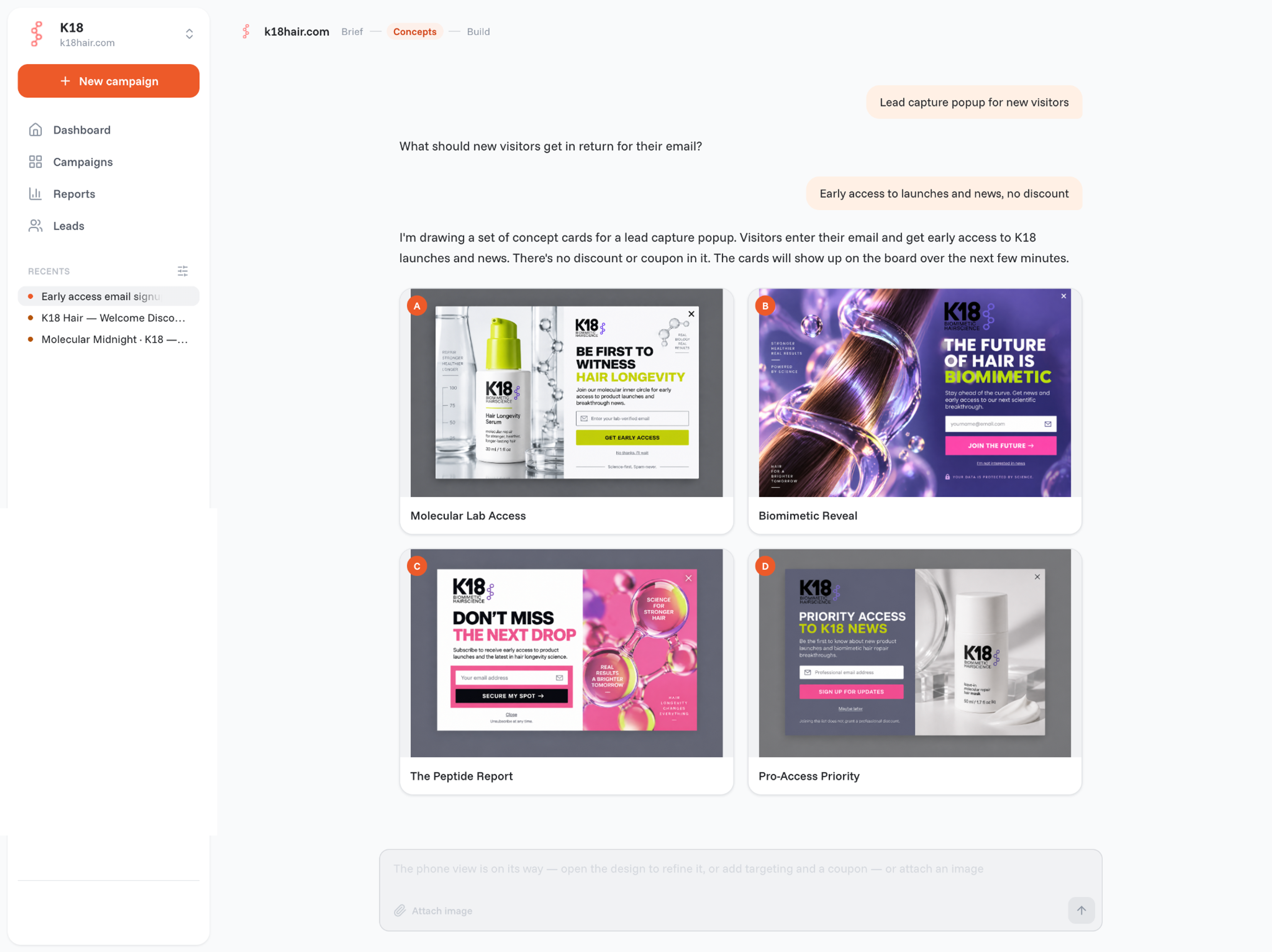
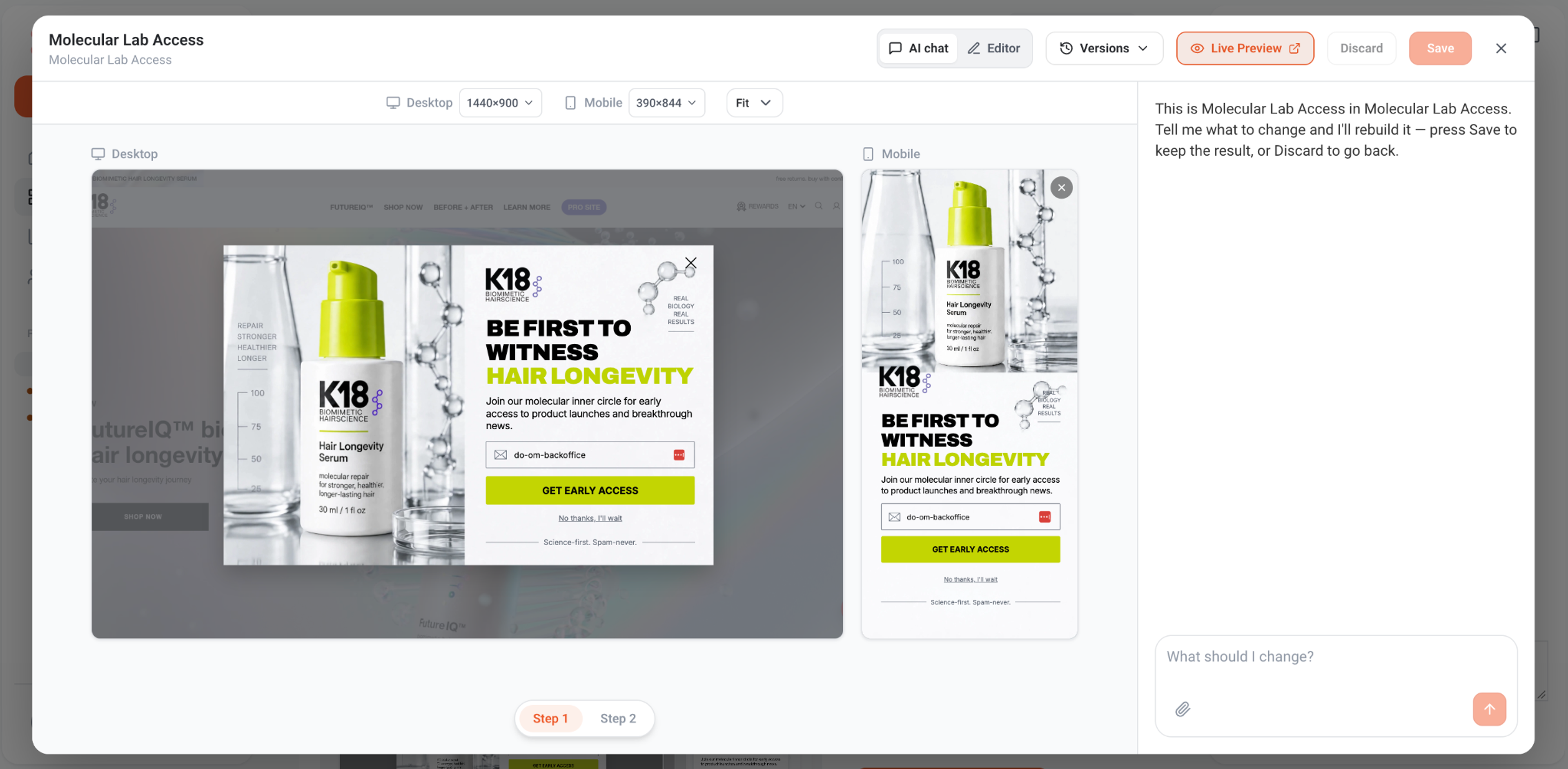
No discount at all: the offer is early access to product launches and news, framed as joining a "molecular inner circle". The product photo and lab props carry the brand's science story, and the "No thanks, I'll wait" link keeps closing easy. It suits brands that don't want shoppers to wait for a code.
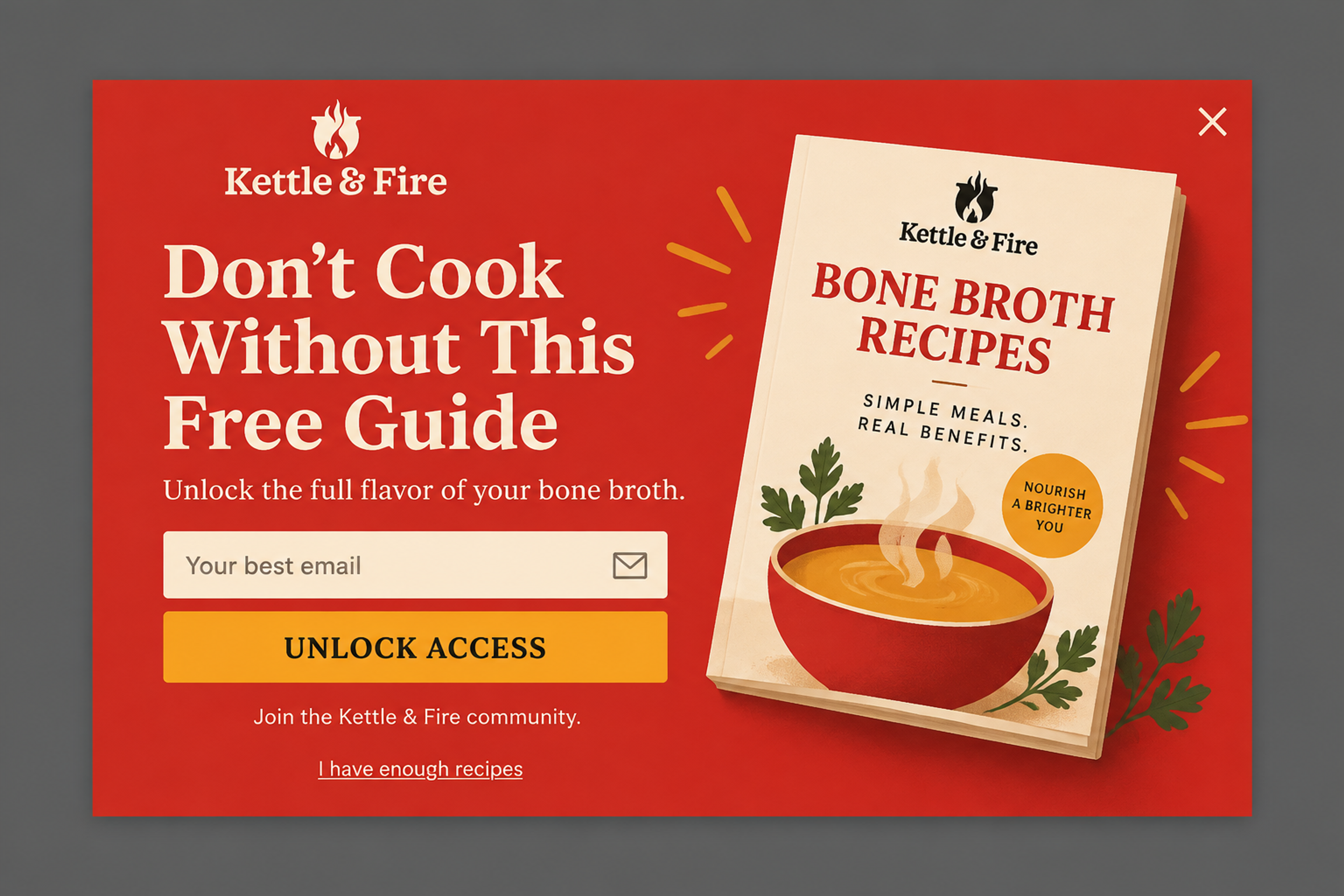
A free guide instead of a discount: a bone broth recipe book in exchange for an email address. The guide's cover is the hero image, so visitors see exactly what they get. It works well for products people need to learn to use, and your first emails can follow up with recipes.
For more ideas, see our lead capture popup examples.
With OptiMonk you don't pick a template or hire a designer. You describe the popup, and the agent designs it, writes it and puts it live on your store.
You can also build the popup from Claude or ChatGPT through the OptiMonk MCP server, without opening OptiMonk.
These six practices apply to any lead capture form, whatever tool you use. For more detail, see our email capture best practices.
Crown & Paw, a store that turns pet photos into art, put two of these into practice: its popup asked for the email first, for 10% off, then asked a few questions about the visitor's pet and revealed the code at the end. It converted at 4.03%, 2.5 times the simple Klaviyo popup the store used before. Read the Crown & Paw case study, or see more results on our case studies page.
Lead capture software shows the form, collects the details and passes them on to your other tools. For an online store, check these before you choose:
For side-by-side comparisons, see our lists of email list building tools and Shopify form builder apps.
A lead capture form is a form that collects a visitor's contact details, usually an email address or phone number, in exchange for something they want. In an online store it's often a popup with one email field and a first-order discount.
Lead generation brings people to your store through ads, SEO or social media. Lead capture collects contact details from the people who are already there, so you can reach them again.
Lead capture software is a tool that shows forms or popups on your website, collects the details visitors enter and sends them to your email, SMS or CRM tool. For stores, look for ecommerce targeting, Shopify discount codes and a Klaviyo or ESP integration.
They do different jobs, and many stores use both. A popup gets noticed by visitors who would never scroll to the footer; an in-page form catches visitors who are already looking for a way to sign up. If you only add one, a well-timed popup with a clear offer is usually the one more visitors see.
As few as possible: usually one field (email) on the first step. If you also want a phone number or a preference, ask for it on a second step after the email is in.
It can be, if you collect consent properly. Tell people what they are signing up for, link your privacy policy, don't pre-tick consent boxes and use double opt-in where it's required, so subscribers confirm their address before you email them.
Your first lead capture popup is one sentence away. Describe the offer and who should see it, and the agent designs the popup for your brand, with a separate mobile version, the targeting you choose and your email tool connected.
Free to start. No credit card.

In this article, we'll share 30 actionable Black Friday marketing ideas for ecommerce businesses to make 2026 your most successful yet.
Learn about email marketing frequency for ecommerce stores. Most send 1-3 emails per week, with frequency adjusted by subscriber engagement and store type.
Let's take a look at the 21 best lead generation software for 2026 and discuss the features that any lead generation tool should have.


