


14 Effective Thanksgiving Marketing Ideas to Boost Your Sales in 2026
Discover creative Thanksgiving marketing ideas to engage customers, build buzz, and drive sales before Black Friday and Cyber Monday.
What ecommerce CRO is, what a good conversion rate looks like, and a 30-point checklist to optimize every page of your store.
In short
Ecommerce CRO means getting more of your store visitors to buy. It matters because every extra order comes from traffic you already pay for. Track your funnel, find the page where most shoppers drop off, fix it with the checklist below, and A/B test each change.
A shopper taps your Instagram ad, scrolls the product page, adds a jacket to the cart, then sees $9.95 shipping on the last step and closes the tab. You paid for that click, and you'll pay again to find the next shopper.
Doubling your traffic is expensive. Getting 2 buyers instead of 1.8 out of every 100 visitors usually isn't, and that's what ecommerce optimization is about.
Ecommerce CRO (conversion rate optimization) is the practice of turning a larger share of the people who visit an online store into customers. The average ecommerce conversion rate is 1.81%, based on OptiMonk data from 18,000 ecommerce websites. To raise yours, measure each step from product view to order, start where the most shoppers leave, and test every change against the old version.
Ecommerce CRO is also called ecommerce optimization or ecommerce conversion optimization. Your conversion rate is the share of sessions that end in an order:
Conversion rate = orders ÷ sessions × 100
For the details, see what is conversion rate and how to calculate it.
CRO is different from SEO and paid ads. SEO and ads bring new visitors to your store; CRO gets more orders out of the visitors you already have. That's why it pays twice: every fix also makes your ad spend and your content work harder.
You can track two kinds of conversion. Macro conversions are orders. Micro conversions are the steps before them, such as an email signup, a product view or an add to cart, and they show you where the path breaks.
The average ecommerce conversion rate is 1.81%, according to our analysis of 18,000 ecommerce websites over the past year. Use it as a rough reference, not a target: your products, prices and traffic sources differ from everyone else's. The useful comparison is your own store against its previous month or quarter.
For more numbers, see our CRO statistics, the conversion rate by industry and the average Shopify conversion rate.
Most lost orders don't happen on the homepage. In the same OptiMonk data, the average cart abandonment rate is 70.32%, so seven in ten shoppers who fill a cart leave without paying. Our guide on how to reduce cart abandonment covers the causes and fixes in depth.
Ecommerce CRO works as a loop: measure, find the problem, guess the cause, test the fix, repeat. Skipping the first two steps is the most common mistake. Stores copy a tip from a list, change three things at once, and never learn what worked.
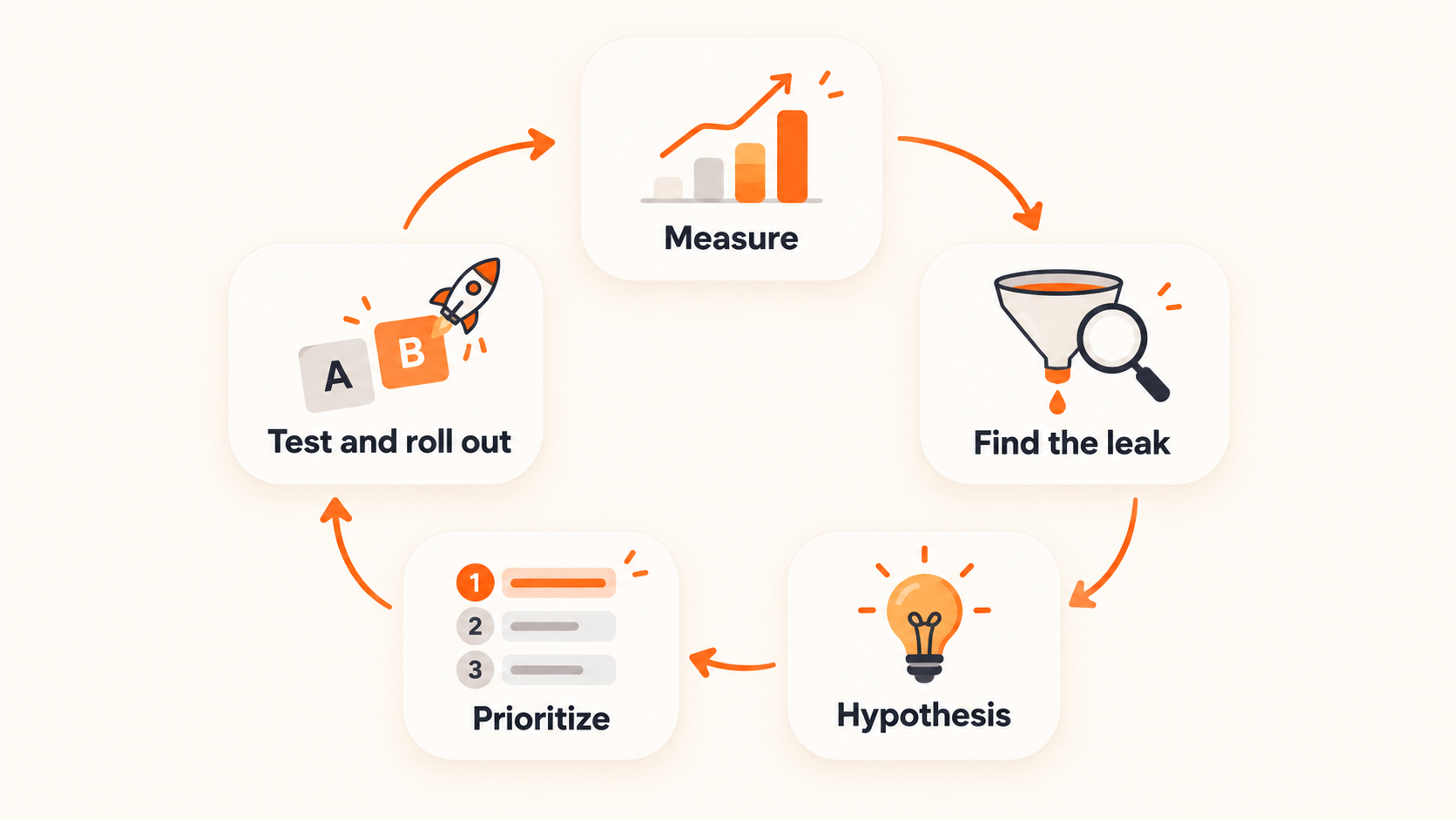
Set up a funnel report that shows how many sessions reach each step: sessions → product view → add to cart → checkout → order. Google Analytics 4 has a funnel exploration report for this, and most store platforms show a similar one.
Split the funnel by device and traffic source. A paid social visitor and a returning email subscriber behave very differently, and the click-through rate of your ads and emails only tells you half the story (see what is a good CTR). For a step-by-step setup, read our guide to ecommerce conversion funnels.
Look for the step where the most shoppers drop off. A product page with many views and few add-to-carts is a different problem from a full cart that never reaches checkout.
The numbers tell you where shoppers leave; they don't tell you why. Heatmaps, session recordings and a one-question exit survey ("What stopped you from buying today?") fill that gap.
Turn what you found into one testable sentence: what you will change, for whom, and what should happen. For example: "If we show the shipping cost on the product page, more cart visitors will start checkout."
A clear hypothesis keeps tests small. It also makes a losing test useful, because you learn which guess was wrong.
You'll have more ideas than time. Score each one on impact (how many shoppers it touches and how much it could move them) and effort (time, money, developer help), both from 1 to 5. Then sort by impact ÷ effort, and start with the fixes at your biggest leak.
| Idea | Impact (1–5) | Effort (1–5) | Score |
|---|---|---|---|
| Show shipping cost on product pages | 4 | 2 | 2.0 |
| Exit-intent popup for shoppers with a full cart | 4 | 1 | 4.0 |
| Redesign the whole checkout | 5 | 5 | 1.0 |
The scores above are an example. Use your own funnel data to set them.
Run an A/B test: half your visitors see the current version, half see the change. Give the test enough traffic and run it for at least one full weekly cycle, so weekday and weekend shoppers are both counted.
For popups, add a holdout group that sees no popup at all. It shows the orders the popup really adds, not just how many people clicked it. When a test wins, roll it out and go back to step 1.
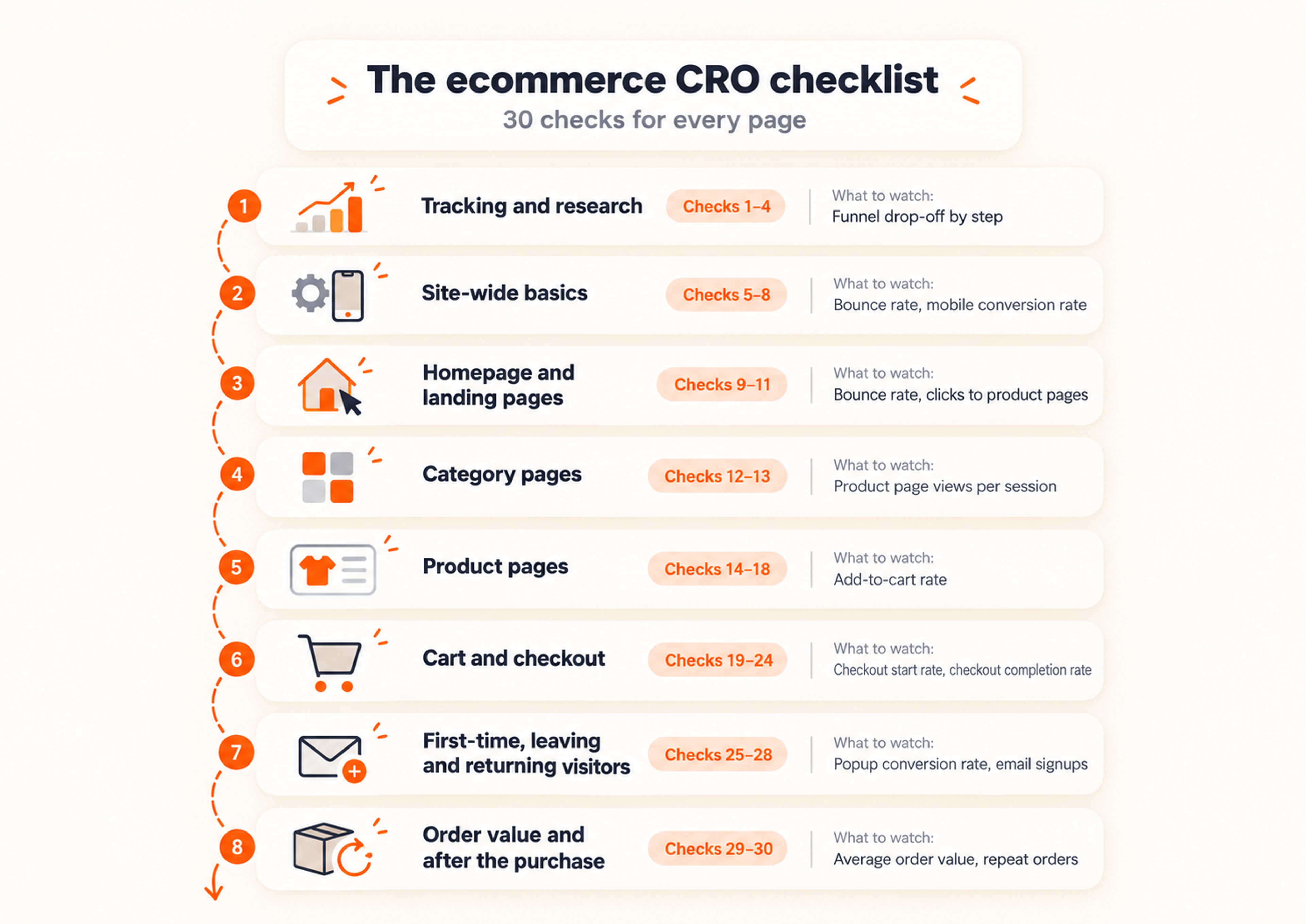
This ecommerce CRO checklist follows the path a shopper takes through your store. Use it as an audit: go through each stage, mark what's missing, then fix the stage where your funnel loses the most shoppers first.
| Stage | Checks | What to watch |
|---|---|---|
| Tracking and research | 1–4 | Funnel drop-off by step |
| Site-wide basics | 5–8 | Bounce rate, mobile conversion rate |
| Homepage and landing pages | 9–11 | Bounce rate, clicks to product pages |
| Category pages | 12–13 | Product page views per session |
| Product pages | 14–18 | Add-to-cart rate |
| Cart and checkout | 19–24 | Checkout start rate, checkout completion rate |
| First-time, leaving and returning visitors | 25–28 | Popup conversion rate, email signups |
| Order value and after the purchase | 29–30 | Average order value, repeat orders |
1. Set up a funnel report. Use GA4's funnel exploration or your platform's analytics to see sessions, product views, add-to-carts, checkouts and orders. Without it, every other check is a guess.
2. Use heatmaps and scroll maps on key pages. Tools like Hotjar or Microsoft Clarity show where shoppers click and how far they scroll. If most visitors never scroll to your reviews, move them up.
3. Watch session recordings of shoppers who dropped off. Filter recordings by sessions that reached the cart but not the order. Ten recordings often show a bug or a confusing step faster than a month of reports.
4. Ask leaving shoppers one question. Show a survey popup on exit intent: "What stopped you from buying today?" Give four or five answer options, such as price, shipping cost or "just looking", and fix the most common answer first.
5. Check page speed. Run your homepage, a category page and a product page through PageSpeed Insights. Fix the largest item on each report first, which is usually oversized images or apps you no longer use.
6. Test the store on a phone. Buy something on your own store with your phone. Buttons should be easy to tap, text easy to read, and "Add to cart" within reach; many themes have a setting that keeps the button on screen as the shopper scrolls.
7. Make search and navigation obvious. Put a visible search box at the top of every page and keep the main menu to 5–7 categories. Shoppers who search usually know what they want, so make sure the results page shows products, not a "no results" dead end.
8. Show trust signals on every page. Display your review rating (Trustpilot, Google or your review app), press mentions if you have them, and contact and returns links in the footer. First-time visitors look for these before they hand over card details.
9. Lead with one clear value proposition. The first screen should say what you sell, who it's for and why it's better, in one short headline. A/B test that headline; it's one of the cheapest tests you can run.
10. Test a single hero against a carousel. A rotating carousel splits attention between several messages, and most shoppers only see the first slide. Test one strong image and one offer against it.
11. Match the landing page to the ad or email that sent the visitor. If the ad promises 20% off running shoes, the shopper should land on running shoes with the 20% visible. More on conversion rate optimization for landing pages. Changing homepage content for each visitor is on-page personalization; see ecommerce personalization for that.
12. Put bestsellers and filters first. Too many choices slow shoppers down. Sort by bestsellers by default and put the filters shoppers use most (size, price, color) at the top. Our category page guide has more ideas.
13. Show your most popular products to shoppers leaving a category page. A shopper who leaves a category page often hasn't found the right product yet. Lammle's Western Wear showed its most popular products in an exit-intent popup to category page visitors and saw a 26.3% increase in revenue from these shoppers, without a discount.
14. Write a benefit-led headline and a short benefit list. Say what the product does for the shopper, then add three to five short benefits under it. Specs belong lower on the page. See our product page guide.
15. Use several photos and a short video. Show the product from every angle, in use and next to something for scale. A short video answers questions a still photo can't. Ideas in types of product photography.
16. Show reviews and customer photos above the fold. Put the star rating next to the product name and link it to the reviews. Photos from real customers (user-generated content) show how the product looks outside the studio.
17. Put shipping cost, delivery date and returns next to "Add to cart". One line is enough: "Free shipping over $50 · Arrives Thursday · Free 30-day returns." Shoppers shouldn't have to reach checkout to find these answers.
18. Recommend products that complete the purchase. Suggest accessories that go with the product (a case for the phone, a strap for the camera), not similar products that restart the decision. More in our guide to product recommendations.
19. Show the full cost before checkout. Extra costs like shipping, taxes and fees are the top reason shoppers abandon a cart, according to Baymard Institute. Show them on the product page and in the cart, not for the first time on the payment step.
20. Offer guest checkout. Forcing an account before the first order loses buyers. Let shoppers buy as guests and offer an account on the thank-you page.
21. Cut form fields and show progress. In Baymard's survey, 17% of US shoppers who abandoned an order (leaving out those just browsing) said the checkout was too long or complicated. Remove every field you don't need to ship the order, use address autocomplete, and show a progress indicator ("Step 2 of 3").
22. Offer the payment methods your shoppers use. PayPal, Apple Pay, Google Pay, Shop Pay and buy now, pay later options like Klarna. Wallets also shorten checkout, because the shopper doesn't type card details at all.
23. Put trust badges next to the payment step. Security and payment logos near the card fields reassure first-time buyers. See our guide to trust badges for which ones to use.
24. Apply discount codes automatically. An empty coupon field sends shoppers off to search for a code. On Shopify, OptiMonk can create unique codes and apply them at checkout automatically, so the shopper never types one.
For every other checkout fix, see our guides to checkout page optimization and to reducing cart abandonment.
The checks above improve the pages. These four reach the shopper at a specific moment: the first visit, the exit, the return. The next section shows how to build them with OptiMonk.
25. Give first-time visitors a reason to sign up. Offer a welcome code for an email address, and start with an easy yes/no question before the form. Mott & Bow used multi-step popups like this to reach a 10%+ conversion rate and more than 100,000 subscribers. More ideas in email popups.
26. Ask one question to segment new subscribers. A quiz popup such as "What are you shopping for today?" tells you what each subscriber wants. Send the answer to your Klaviyo lists and segments, and use survey answers to show each shopper the next popup that fits.
27. Catch cart abandoners on exit intent. Show an exit-intent popup only to shoppers with something in the cart, and match the offer to the cart value: a reminder for small carts, free shipping or a code for larger ones. Cart abandonment popups convert at 17.12% on average, according to our popup statistics.
28. Remind returning visitors what they viewed. Recognize returning visitors and show the products they viewed last time with a "Welcome back" message. It saves them from searching again and brings the decision back.
29. Raise order value with bundles and a free shipping threshold offer. Target a popup by cart value: "Add $12 more and shipping is free." After an add to cart, suggest a matching product as an upsell. Both raise your average order value; our guide on how to upsell has more.
30. Follow up after the visit. Abandoned cart and back-in-stock emails come from your email tool (Klaviyo, Omnisend, Shopify Email). OptiMonk doesn't send emails; the address a shopper leaves in your popup goes into your list, so the flow has someone to write to. Post-purchase upsells run in your checkout or order-confirmation app.
A popup is the one CRO tool that speaks to shoppers who are about to leave. It works next to the other fixes (a faster site, better product pages, a shorter checkout), not instead of them.
It also has numbers behind it. Across OptiMonk campaigns, the average popup converts at 11.09%, and cart abandonment popups at 17.12% (popup statistics).
OptiMonk is an agentic popup builder. You describe the popup in one sentence, for example: "An exit-intent popup for shoppers with a cart over $60: free shipping if they check out now."
The agent designs it in your brand's colors and fonts, writes the copy, builds a separate mobile version and sets the targeting and trigger. Triggers include exit intent on desktop and on mobile, scroll depth, time on page, cart value and returning visitors. Formats include card popups, fullscreen popups, lucky wheels and scratch cards.
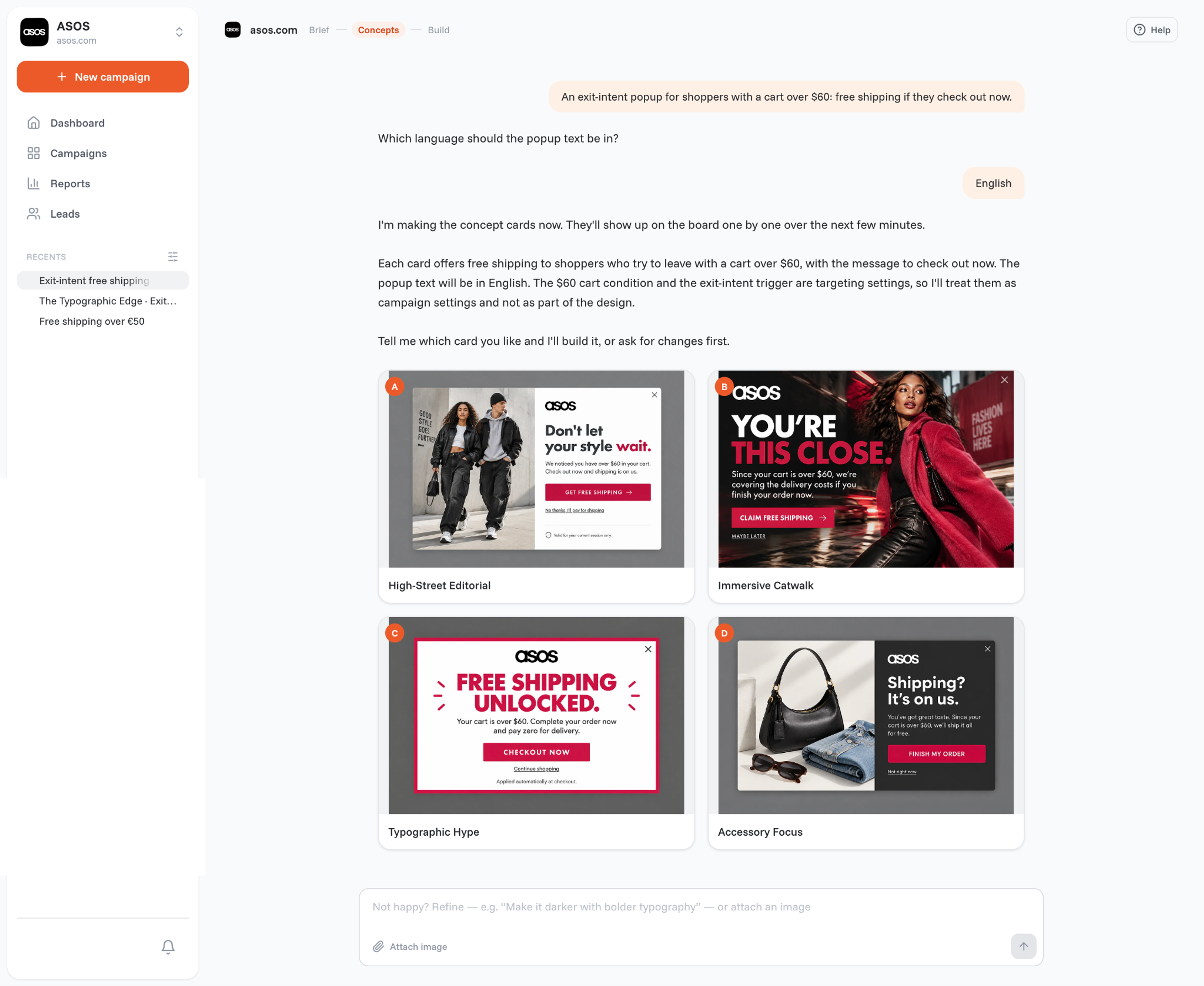
You can also build and edit popups from Claude, ChatGPT or Cursor through the OptiMonk MCP connection, without opening another tool.
The conversation doesn't stop once the popup is live. Ask the agent for an A/B test of the copy, the offer, the whole design or a different campaign type, and it offers to roll out the winner.
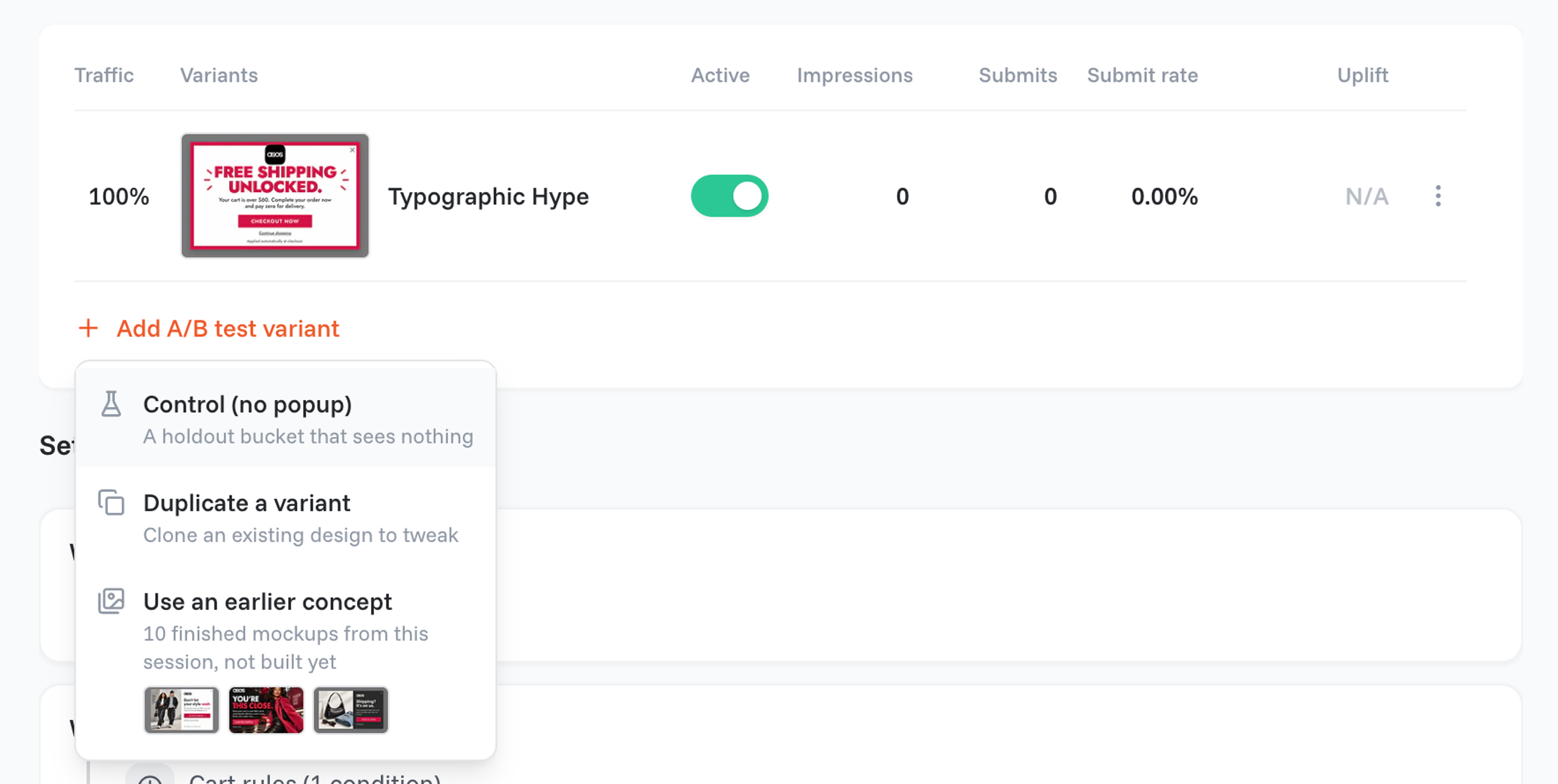
A holdout test adds a "Control (no popup)" group: part of your traffic sees nothing, and the campaign's Overview tab shows the uplift against it (help center). That's step 5 of the CRO process, built in.
Popups only help if they don't get in the way. Frequency limits stop a popup from following a shopper from page to page, and the User Experience Protector caps how many campaigns each visitor sees, so shoppers don't get one popup after another.
These come from the OptiMonk Popup Library. Each one was designed by the OptiMonk agent for a real store's brand.
1. The Pro Choice (designed for Vyron Golf)
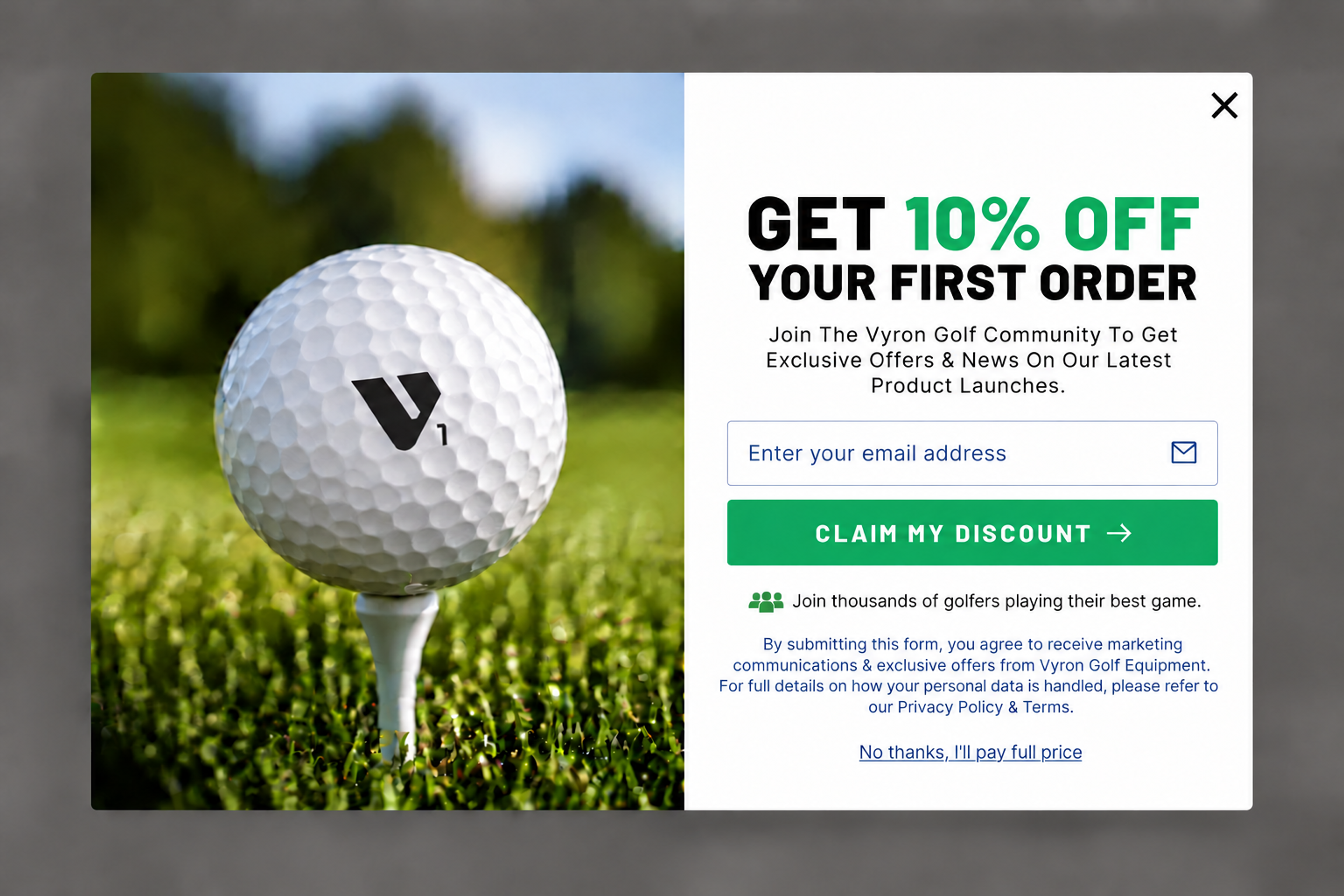
A first-visit offer for an email address, with the "Claim my discount" button and a plain "No thanks" link. It's check 25 in action.
2. The Routine Builder (designed for Saie)
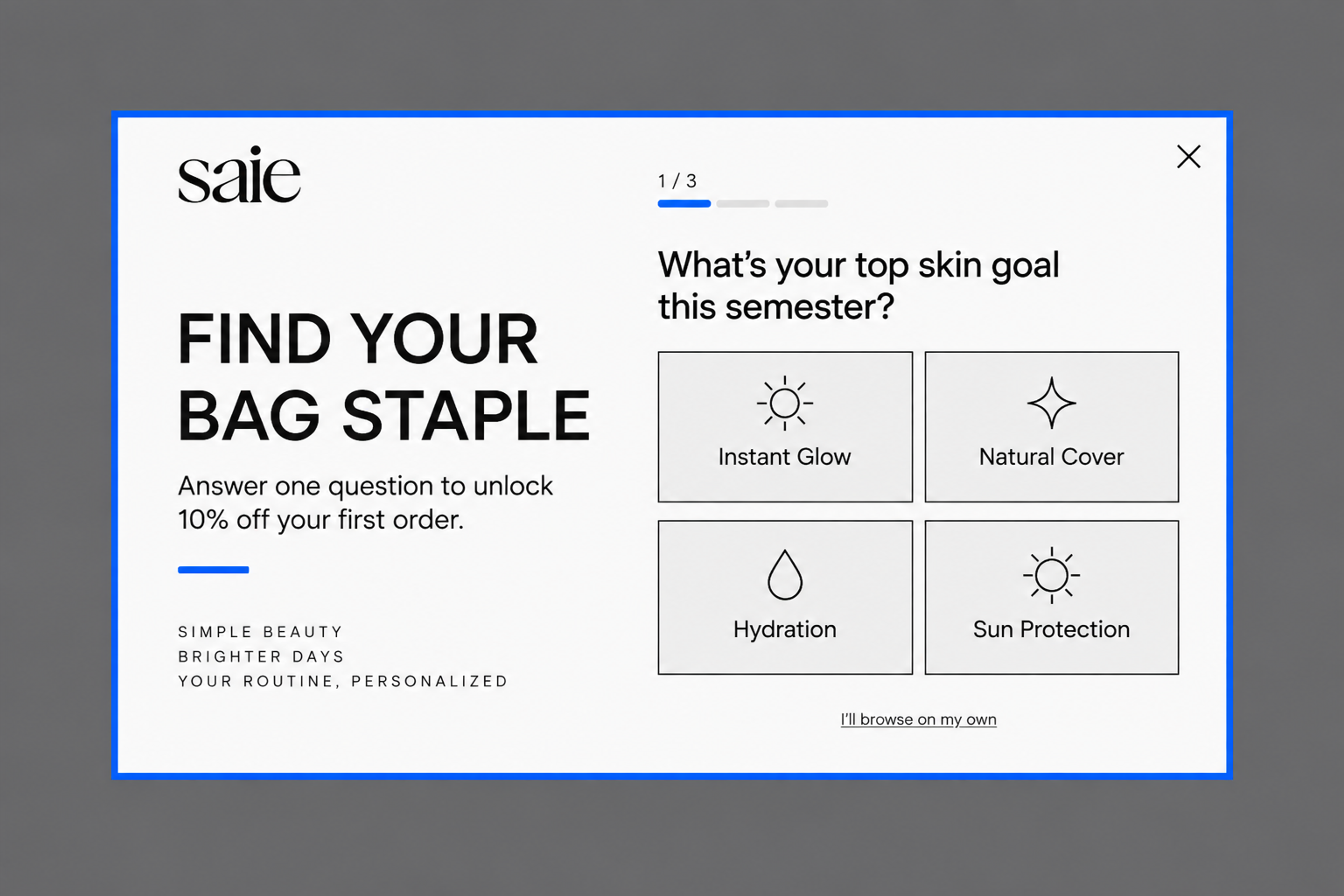
"Find your bag staple": one question with four answers, and 10% off the first order on the email step. The answer tells you what each new subscriber wants, which is check 26.
3. The Morning Mood (designed for Eat Surreal)
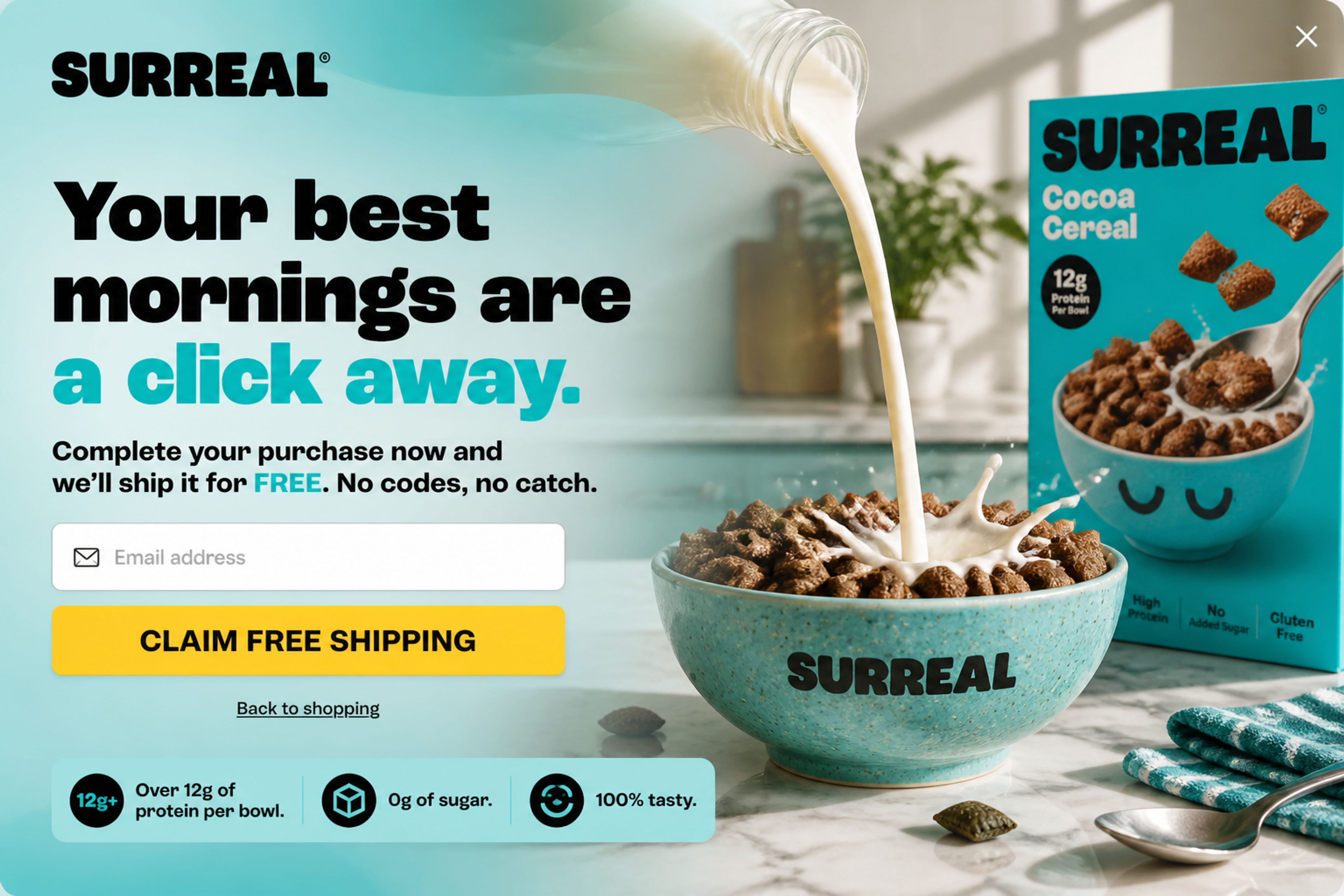
"Your best mornings are a click away." The shopper gets free shipping if they complete the purchase now, with no code to copy. It answers check 27 for carts where shipping cost is the problem.
4. The Immersive Routine (designed for Revox B77)
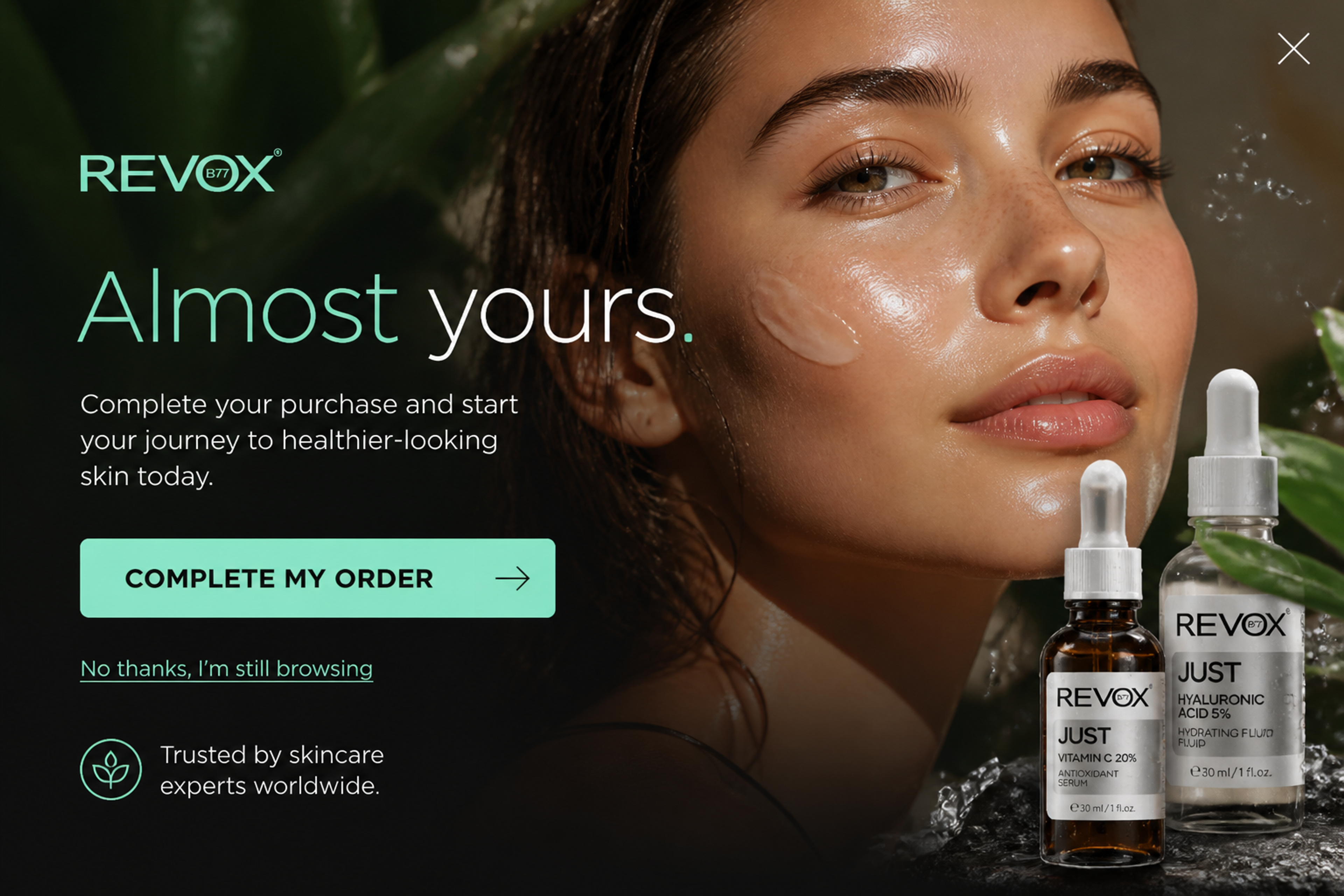
"Almost yours." A reminder without a discount, for shoppers who are still deciding (checks 27 and 28). You keep the margin and still bring the cart back into view.
5. The Weekend Warrior Upgrade (designed for Herschel)
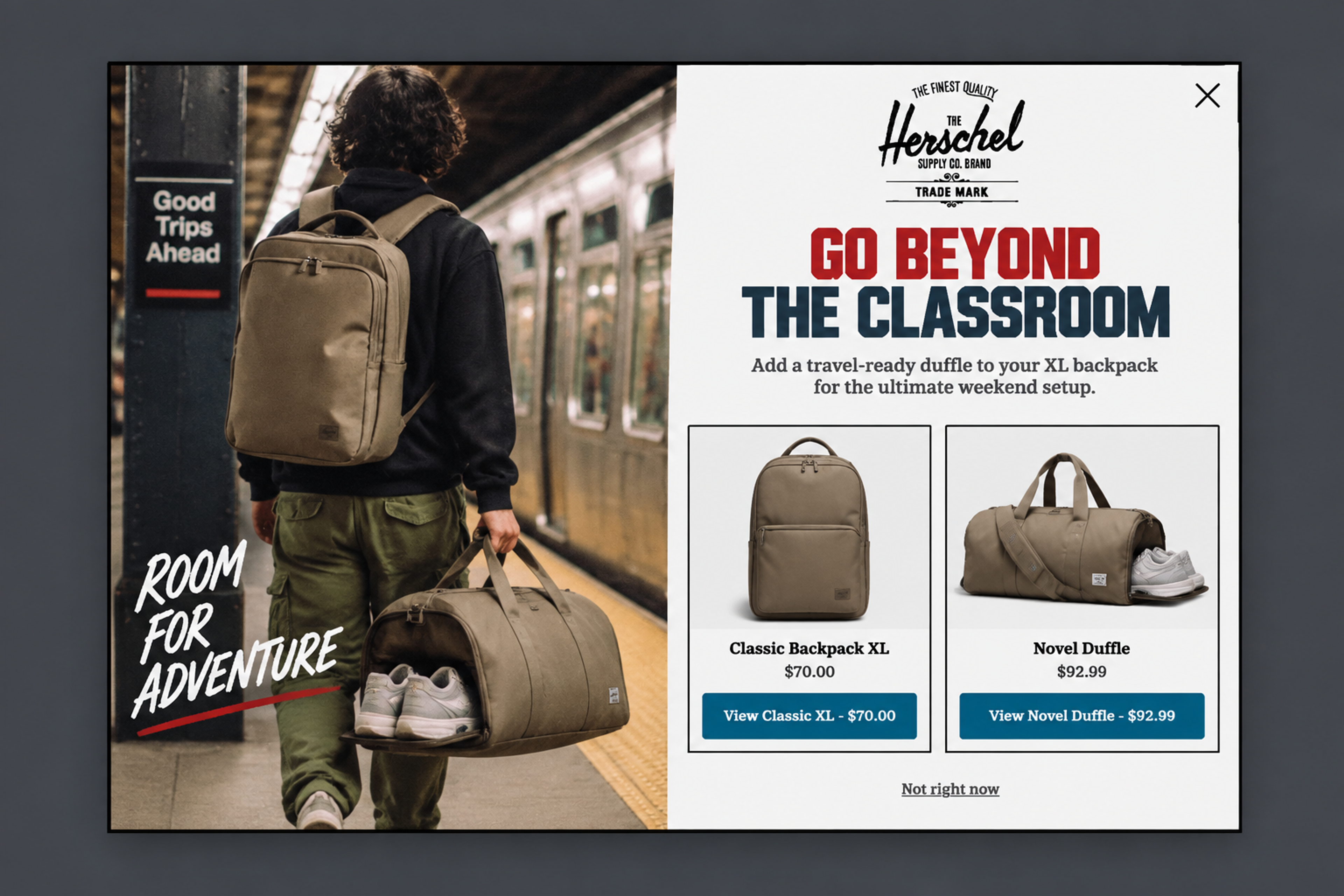
A duffle suggested next to the backpack the shopper is buying, with both prices shown. It's a matching product, not a similar one, which is how check 29 raises order value.
See more examples in the Popup Library, or read how other stores did it in our conversion rate optimization case studies. For the full setup of the most common one, see how to create an exit-intent popup.
You need four kinds of tools. Analytics (GA4 or your platform's reports) shows where shoppers drop off. Behavior tools (heatmaps and session recordings) show why.
Testing tools compare two versions of a page or offer. Onsite tools such as popups reach the shopper on the page, at the moment they're about to leave.
For a comparison with prices, see our list of CRO tools. For the wider stack, read our picks of AI tools for ecommerce and ecommerce tools for growing stores.
The process is the same on Shopify, with three differences. Shopify's built-in Conversion rate breakdown report (Analytics > Reports) shows the funnel: sessions, sessions with cart additions, sessions that reached checkout and sessions that completed checkout, so you can start measuring on day one.
The checkout is closed to third-party scripts, so popups and other onsite tools run on the product, collection and cart pages, not inside checkout (help center). And discount codes can be applied automatically, so shoppers don't type them (help center).
For benchmarks and Shopify-specific tips, see our guide to Shopify CRO. For traffic and retention ideas, read our Shopify marketing guide.
It's the work of raising the share of store visits that end in an order, using data instead of guesses. You find where shoppers drop off, change one thing at a time, and keep only the changes that bring more orders in a test.
The average is 1.81%, based on OptiMonk data from 18,000 ecommerce websites. A good rate is one that beats your own previous period, because products, prices and traffic sources make every store different. Compare by device and traffic source, too.
SEO brings more visitors to your store from search engines. CRO gets more orders from the visitors you already have. They work best together: more traffic is worth more when a higher share of it buys.
Quick fixes, like showing shipping costs earlier, can show up in your funnel report within days. A proper A/B test needs enough traffic for a clear result and at least one full weekly cycle. Small stores need longer tests than large ones.
Not when they're targeted. Show each popup only to the shoppers it's for, set a frequency limit, and use a separate mobile version that fits the screen. A holdout test then shows whether the popup adds orders, so you're not guessing.
Run through the checklist after every bigger change, such as a new theme, a new app, a new checkout or a new traffic source. Between changes, a regular review (for example once a quarter) catches problems that creep in slowly. Check your funnel report every week.
Open your funnel report, find the step where most shoppers drop off, and work through that stage of the checklist first. Fix one thing, test it, then move to the next leak.
If that leak is the moment shoppers leave, describe the popup you need in one sentence and the OptiMonk agent designs it, builds the mobile version and sets the targeting.
Free to start. No credit card.

Discover creative Thanksgiving marketing ideas to engage customers, build buzz, and drive sales before Black Friday and Cyber Monday.
Learn 5 ways ecommerce brands can turn new subscribers into recurring revenue using welcome flows, personalization, loyalty programs, re-engagement, and referrals.
In this article, we’ve compiled a list of the 25 top ecommerce apps that will help you streamline your operations, boost sales, and grow your online business.


